EducationSoftwareStrategy.com
StrategyCommunity

Knowledge Base

Product

Community

Knowledge Base

TopicsBrowse ArticlesDeveloper Zone

Product

Download SoftwareProduct DocumentationSecurity Hub

Education

Tutorial VideosSolution GalleryEducation courses

Community

GuidelinesGrandmastersEvents
x_social-icon_white.svglinkedin_social-icon_white.svg
Strategy logoCommunity

© Strategy Inc. All Rights Reserved.

LegalTerms of UsePrivacy Policy
  1. Home
  2. Topics

KB42870: How to get the GUID of a subscription in MicroStrategy 9.x


Stefan Zepeda

Salesforce Solutions Architect • Strategy


In some scenarios, a user may want to retrieve the GUID of a subscription. This can be useful for running certain Command Manager scripts.

In some scenarios, a user may want to retrieve the GUID of a subscription.  This can be useful for running certain Command Manager scripts such as:


TRIGGER SUBSCRIPTION GUID <Subscription_GUID> FOR PROJECT "project_name";
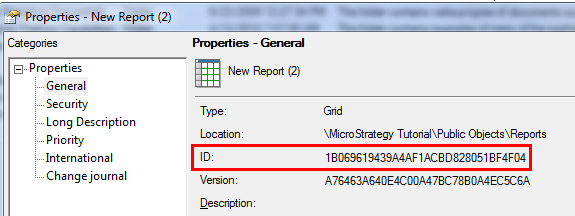
 
 
For most Strategy objects, a user is able to right click the object and go to 'Properties' where the ID of the object is shown.
 

ka02R000000kc6HQAQ_0EM440000002Cu3.png

 
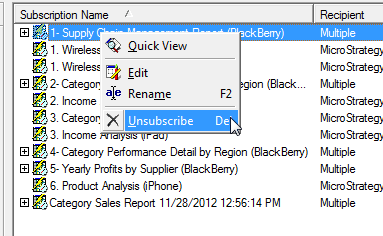
However, when right clicking a subscription, the 'Properties option is not available.
 

ka02R000000kc6HQAQ_0EM440000002Ctz.png

 
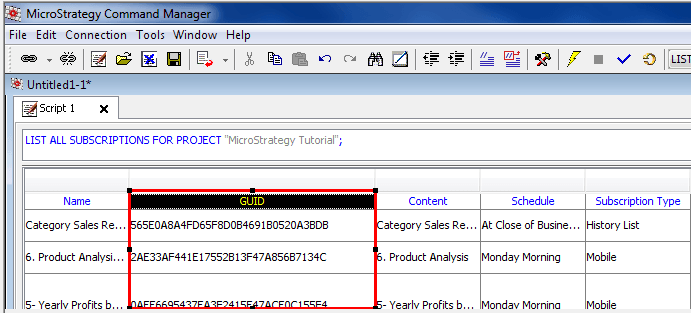
To get the GUID of a subscription, one can use Strategy Command Manager.  Using one of the List Subscriptions outlines will provide the GUID of the subscriptions. 
 

ka02R000000kc6HQAQ_0EM440000002Cu2.png

Comment

0 comments

Details

Knowledge Article

Published:

May 27, 2017

Last Updated:

May 27, 2017