EducationSoftwareStrategy.com
StrategyCommunity

Knowledge Base

Product

Community

Knowledge Base

TopicsBrowse ArticlesDeveloper Zone

Product

Download SoftwareProduct DocumentationSecurity Hub

Education

Tutorial VideosSolution GalleryEducation courses

Community

GuidelinesGrandmastersEvents
x_social-icon_white.svglinkedin_social-icon_white.svg
Strategy logoCommunity

© Strategy Inc. All Rights Reserved.

LegalTerms of UsePrivacy Policy
  1. Home
  2. Topics

KB42873: In Microstrategy Web 9.4.x-10.x, when displaying a report in outline mode, the headers of the collapsed categories are visible


Stefan Zepeda

Salesforce Solutions Architect • Strategy


When displaying a report in Microstrategy Web in outline mode, even when the categories are not expanded, the header of the hidden category is visible.

SYMPTOM:
When displaying a report in Strategy Web in outline mode, even when the categories are not expanded, the header of the hidden category is visible.
 
STEPS TO REPRODUCE:

  1. In Strategy Developer, create a report with: Customer Country, Customer Region, Customer State in the rows; Cost in the columns
  2. Run the report
  3. Select Display Outline Results in the Grid options
  4. Open the report in Strategy Web

As seen on the screenshots, the attribute headers "Customer Region" and “Customer State” are still visible and there is a large space next to the main category in the grid when the Customer Country attribute is not expanded.
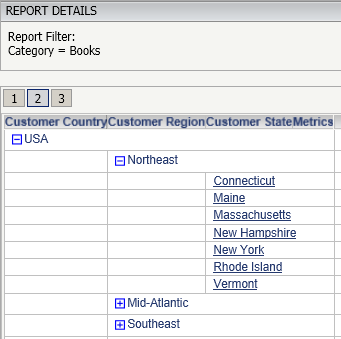
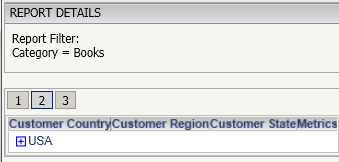
ka02R000000kWwvQAE_0EM440000002CnP.png


ka02R000000kWwvQAE_0EM440000002CnN.png

 
CAUSE:
This is working by design as it helps to know the subcategories available.
 
ACTION:
Users should post to the Ideas Exchange to request to be able to choose to hide the headers in future versions: 
https://success.microstrategy.com/s/topic/0TO44000000FlkMGAS/Style%20%26%20Templates%20-%20U066?t=1492095779960&tabset-215d6=4aa55 


Comment

0 comments

Details

Knowledge Article

Published:

April 13, 2017

Last Updated:

April 13, 2017