The administration of Users, User Groups and Security Role objects may be made in an easy way through a Command Manager outline feature that allows the automatic management of privileges in Strategy 9.x.
In order to grant Strategy privileges through Command Manager, follow the steps below:
1. In Command Manager, browse through the menu Edit > Insert/Search Objects > Outlines.
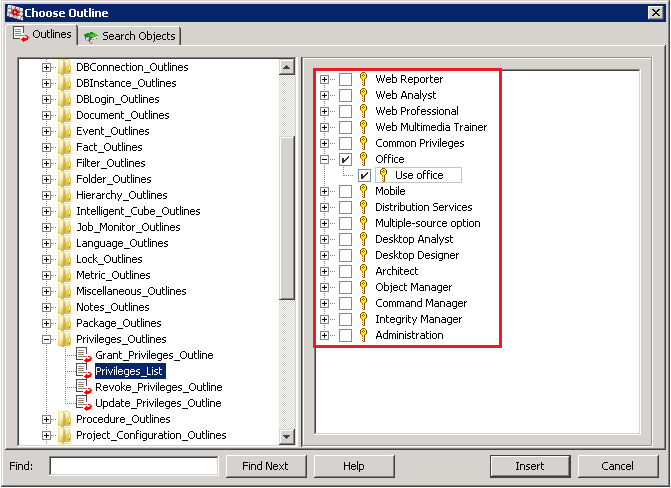
2. In the Privileges_Outline folder, select Privileges_List outline.
3. Check all the privileges that will be granted to the User, User Group and/or Security Role as desired, click Insert as in the example below:
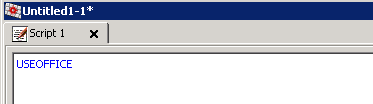
4. As of clicking on the Insert button, following statement will be displayed in the Command Manager script area with a list of all the privileges selected in the step 3:
5. Select the Grant_Privileges_Outline outline and click Insert for the following command to be displayed in the script editor:
Sample Code/Error
GRANT <privilege1> TO ( "<login_name>" | GROUP "<user_group_name>" | SECURITY ROLE "<sec_role_name>");
6. As the place holders are correctly replaced, the script can be validated and then executed for the privileges to be automatically granted.
For further information on automating tasks using Strategy Command Manager, refer to the Strategy System Administration Guide product manual.
For reference on a comprehensive list of privileges, check the Strategy Supplemental Reference for System Administration Guide product manual.
