SUMMARY:
This issue has been classified as a defect by Strategy. The impact is limited to Strategy Metric Editor with 9.x product with Large Metric Types. Current one workaround is available in the current document. A solution/code fix for this issue is not available in current releases but is being reviewed for a future Strategy release.
SYMPTOM:
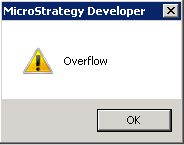
In Strategy Developer 9.x, when users try to edit an existing Metric, the following error appears:
CAUSE:
This issue occurs because the GUI cannot handle the expression length because it exceeds the limitation of the Metric Editor This is a known issue classified as a defect with Strategy 9.x.
ACTION:
Contact Strategy Technical Support for an update on the status of the issue. Currently this issue is still being reviewed for feasibility by our Technology team for an upcoming scheduled Strategy release.
WORKAROUND:
Use Strategy Web Metric to modify the Metric instead of Strategy Developer.
KB43436: New feature in 9.3.1 Strategy Web – Metric Creation/Editing

Web Editor
ADDITIONAL TROUBLESHOOTING:
If the issue is occurring, please consider calling Strategy tech support with the following information of troubleshooting already done. The issues may be similar or different depending on what limitation was hit.
1. A copy of the Metadata.
2. Location of the metric or other object causing the Overflow Message inside the Metadata.
3. Steps to create the Overflow Metric.
TO LEARN MORE:
KB43436: New feature in 9.3.1 Strategy Web – Metric Creation/Editing
KB46303: "String in context Object Name of Metric object with id cannot exceed the maximum length of 250 characters" appears after choosing multiple metrics at once and selecting new metric in Strategy Analytics Express.
