SUMMARY
This issue has been classified as a default behavior by Strategy. The impact is limited to cases when logical tables are inadvertently deleted from the schema collection. A solution for this issue is present and provided in this document.
SYMPTOM
In Strategy 2021, after migrating objects to a higher environment using Object Manager packages the following error is seen when attempting to update the schema with a 3-tier connection.
2015-06-02 00:05:19.007-06:00 [HOST:XX.XX.XX.XX][PID:7930][THR:2725673280][Engine][Error][0x80042202] Error(s) occurred while loading schema: DSSSQLEngine: Schema loading error: [DFCSCHEMA] Population Exception: The object shown in the following hierarchy no longer exists in schema: -Relation-TableObject is not found in DFCSchema during DFC conversion.( MTRL_COLR_FCT )
Updating the schema via 2-tier connection is successful without issue
STEPS TO REPRODUCE
The following steps are general steps based on the Strategy Tutorial project in which the error has been seen:
CAUSE
This error is caused by a missing logical table in the schema table collection (MTRL_COLR_FCT). The reason for this table deletion is unknown but without it all 3-tier schema updates will fail.
ACTION
To restore the missing logical table run the schema verifications tests with the latest version of ScanMD as seen below:
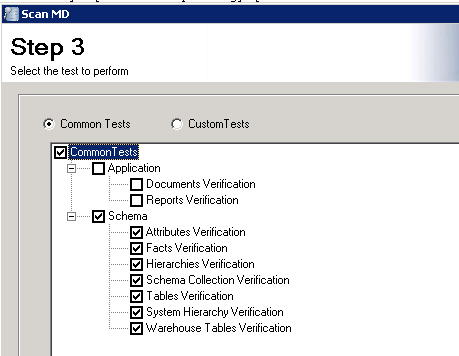
When running the test the user should see entries similar to the following:
[2015/06/03 23:09:30.27][Error Found][Strategy Tutorial][Schema Collection Verification] [Missing References: Schema collection does not contain all needed objects in its Table collection][2015/06/03 23:09:45.48][Process Started] [Strategy Tutorial][Rebuild Schema Collection.] [Fix started] [Fixing] [Missing References: Schema collection does not contain all needed objects in its Table collection]
[2015/06/03 23:09:58.01][Process Finished][Strategy Tutorial][Rebuild Schema Collection.] [Fix finished][Success][Missing References: Schema collection does not contain all needed objects in its Table collection]
