EducationSoftwareStrategy.com
StrategyCommunity

Knowledge Base

Product

Community

Knowledge Base

TopicsBrowse ArticlesDeveloper Zone

Product

Download SoftwareProduct DocumentationSecurity Hub

Education

Tutorial VideosSolution GalleryEducation courses

Community

GuidelinesGrandmastersEvents
x_social-icon_white.svglinkedin_social-icon_white.svg
Strategy logoCommunity

© Strategy Inc. All Rights Reserved.

LegalTerms of UsePrivacy Policy
  1. Home
  2. Topics

KB42904: When triggering a subscription with a delivery format of Tablet through Command Manager it gives "Invalid export format: 15" error.


Community Admin

• Strategy


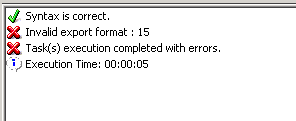
If the user runs the TRIGGER SUBSCRIPTION command in Command Manager, the user gets the error message, "Syntax is correct. Invalid export format: 15 Task(s) execution completed with errors."

SYMPTOM:
 
The user has created a Cache Update Subscription with a delivery format of Tablet. If the user runs the TRIGGER SUBSCRIPTION command in Command Manager, the user gets the error message below. If the delivery format is changed to Flash, the TRIGGER SUBSCRIPTION command can execute successfully.
 

ka04W000000Oe3PQAS_0EM4400000029bg.png


Syntax is correct.
Invalid export format: 15
Task(s) execution completed with errors.

  
STEPS TO REPRODUCE:
 
1. In the 3-Tier Project Source in the Strategy Tutorial Project, create a report called "Test Report"
2. Create a new event called “test”
3. Create a new event based schedule “test” which is triggered by the "test" event
4. Create a Cache Update subscription for the "Test report" in the Strategy Tutorial project where the Delivery Format is set to Tablet.
 

ka04W000000Oe3PQAS_0EM4400000029bj.png

5. Run the Command TRIGGER SUBSCRIPTION "<subscription name>" FOR PROJECT "Strategy Tutorial"; in command manager. It gives the error message “Invalid Export Format 15”

ka04W000000Oe3PQAS_0EM4400000029bp.png


ka04W000000Oe3PQAS_0EM4400000029bk.png

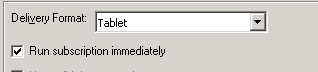
6. If you check the Run subscription immediately checkbox in the subscription editor in Desktop, the subscription is triggered successfully.
 

ka04W000000Oe3PQAS_0EM4400000029bn.png

 
CAUSE:
 
This is a known issue with Strategy Command Manager 9.2.1m
 
ACTION:
 
Contact Strategy Technical Support for an update on this issue.
 
WORKAROUND:
 
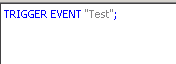
If the subscription is set to an event based schedule, the event can be triggered by the TRIGGER EVENT command in Command Manager. This will trigger the subscription successfully.
 

ka04W000000Oe3PQAS_0EM4400000029bh.png


ka04W000000Oe3PQAS_0EM4400000029bm.png


Comment

0 comments

Details

Knowledge Article

Published:

March 30, 2017

Last Updated:

March 30, 2017