EducationSoftwareStrategy.com
StrategyCommunity

Knowledge Base

Product

Community

Knowledge Base

TopicsBrowse ArticlesDeveloper Zone

Product

Download SoftwareProduct DocumentationSecurity Hub

Education

Tutorial VideosSolution GalleryEducation courses

Community

GuidelinesGrandmastersEvents
x_social-icon_white.svglinkedin_social-icon_white.svg
Strategy logoCommunity

© Strategy Inc. All Rights Reserved.

LegalTerms of UsePrivacy Policy
  1. Home
  2. Topics

KB429044: Error “No Schedules Defined on this project” when attempting to schedule a report in MicroStrategy 9.x


Community Admin

• Strategy


SYMPTOM:
In Strategy 9.x, when attempting to schedule a report, the following error message is displayed “There are no schedules defined on this project. Please contact your Administrator” as seen below:

ka04W000000OfGTQA0_0EM440000002X4N.jpeg

 
CAUSE:
This issue was found to be caused by a permissions issue.
The user attempting to schedule the report was not given enough permissions to schedule a report using that particular schedule.
ACTION:
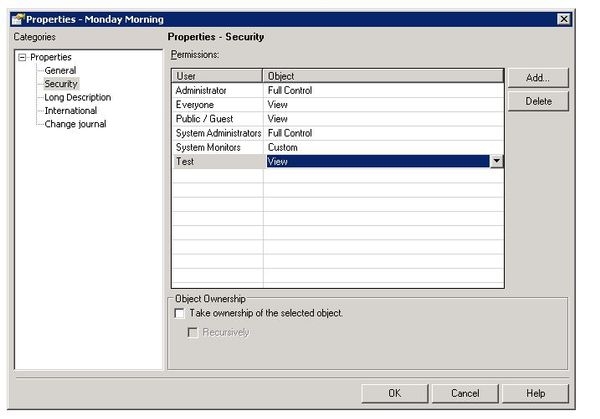
A user that can modify the permissions must adjust the permissions so that the user has at least “View” permissions. This can be altered within the properties menu after right-clicking on the schedule.
Within the security menu, the option to add and modify user/group permission can be found here. A screenshot of these options can be found below:
ka04W000000OfGTQA0_0EM440000002X4L.jpeg

Comment

0 comments

Details

Knowledge Article

Published:

December 26, 2018

Last Updated:

December 26, 2018