“Unsupported attribute element browsing using schema rowset” error appears when using search box on SAP variable in Strategy 10.x
SYMPTOM:
Variables in SAP BW allow user input into cube execution. In Strategy, variables are automatically imported as prompts belonging to the OLAP query cube object.
In Strategy 10.x, when running a dashboard against Connect Live MDX cube that contains a SAP variable prompt and using the search box to look for an existing value, the following error appears:

The error message displays:
(MDX Engine encountered an exception[[MDX] Unsupported attribute element browsing using schema rowset] The element net server was unable to load an element collection from the element server due to a failure.Error in Process method of Component: ElementNetServer, Project Strategy Tutorial, Job 205, Error Code= -2147214974.)
CAUSE:
The cause for this issue is that the imported SAP query cube contains a SAP variable that is required for cube execution. For instance, a SAP query cube contains a variable on Region and then attribute Year, attribute Region and metric Revenue in the template. If the variable is required for the SAP query cube, no matter using search box on Region or Year, it will hit the error.
SUMMARY:
If the imported SAP query cube doesn’t contain any variable, using search box to look for an existing element on each attribute won’t hit the error.
Strategy 10.x supports different types of SAP variable, including Characteristic Value Variables, Hierarchy Variables, Hierarchy Node Variables, Text Variables, Formula Variables. Each variable type can be set to be required or not.
In the BEx Variable dialog box, three options are listed under Variable Is.
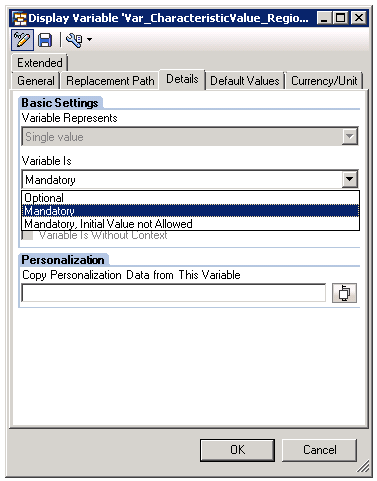
If the imported SAP query cube contains a SAP variable, no matter what variable type:
If the variable is ‘Mandatory’ or ‘Mandatory, Initial Value not Allowed’, using search box to look for an existing element on any attribute will hit the error.
If the variable is ‘Optional’, using search box to look for an existing element on any attribute won’t hit the error.
WORKAROUND:
Set the variable to ‘Optional’ in the SAP query cube.
KB429106
