Sometimes due the large number of caches associated to a specific project, Cache Monitor will either not be able to display all or will display multiple pages making it difficult and cumbersome to tally the total number of caches.
This Technical Note explains four methods to find out the number of caches affecting ‘Maximum number of Caches’ Project Level setting in Desktop.
Method1: Cache Monitor
This is the most straight forward method. The administrator should check XML (for Strategy 9.X and up) and History List caches to account for the total number of caches.

Prior Strategy 9.X, Cache Monitor limited the cache display to 25,000 caches. Therefore for versions 8.X and below this method will not help to quantify the total number of caches associated to a project.
Method2: Command Manager
The project administrator can execute the following Command Manager script:
LIST ALL REPORT CACHES FOR PROJECT "My Project";
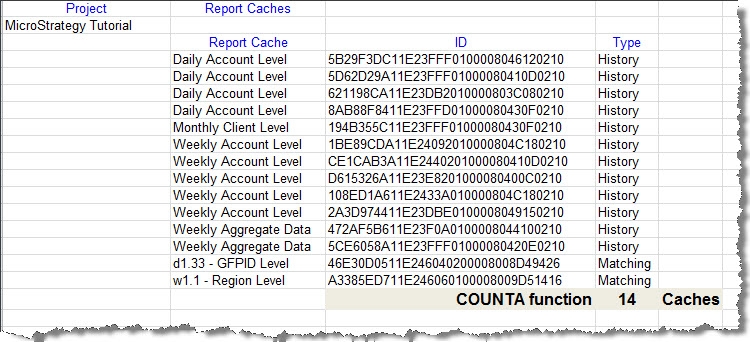
This second method gives detailed information about project’s Caches. However, neither of the display results’ options (grid, list, text and file) will give in a straightforward way the cache count. As a workaround the administrator can export results to Excel and in Excel use a COUNT or COUNTA function over one of the result’s columns to figure out the cache number.

Method3: File Count
Within the server, locate the folder or directory where the Project’s caches are stored (cache file location specified in the Project Level settings). The folder for the project will have the project ID in its name. There are within the folder two extension types: *.che and *.idx files.
To approximate the number of caches apply the following formula:
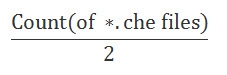
This is a rough estimate to count the number of caches. Each cache consists of an *_Info.che and a *.che file with the same ID. It is possible for non-indexed caches to reside within the cache directory and therefore not be cleaned up by the Intelligence Server (i.e. they are not cataloged within the index files in the cache storage directory).
Method4: Binary Parser (Technical Support only)
Technical Support could use a binary parser (non-distributable) to parse the Cache Pool files (.idx) and accurately discover how many caches are associated to the project.
The .idx files should be sent to Strategy Technical Support for analysis.
Notes:
