EducationSoftwareStrategy.com
StrategyCommunity

Knowledge Base

Product

Community

Knowledge Base

TopicsBrowse ArticlesDeveloper Zone

Product

Download SoftwareProduct DocumentationSecurity Hub

Education

Tutorial VideosSolution GalleryEducation courses

Community

GuidelinesGrandmastersEvents
x_social-icon_white.svglinkedin_social-icon_white.svg
Strategy logoCommunity

© Strategy Inc. All Rights Reserved.

LegalTerms of UsePrivacy Policy
  1. Home
  2. Topics

KB42976: New in MicroStrategy Web 9.3.1: Ability to enable links for Attributes in the Page By axis


Community Admin

• Strategy


This knowledge base article describes a new functionality in MicroStrategy Web 9.3.1 that allows users to define links on attribute elements in the page-by section of a report.

Feature Description:
 
In Strategy Web 9.3.1, users can define links on attribute elements in the page-by section of a report. If the target report or report services document is prompted, page-by element selections can be passed on to the target document to answer element prompts dynamically.
 
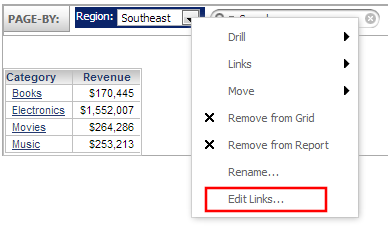
To do so, move an attribute to the page-by section. Then, right-click and choose edit links entry:
 

ka04W000000OgeCQAS_0EM4400000026ky.png

 
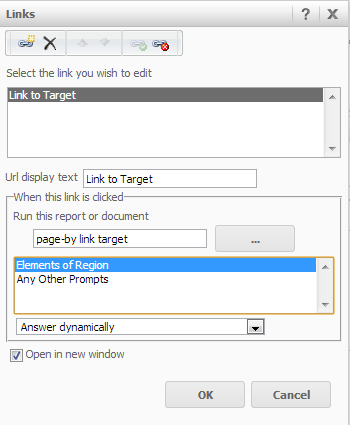
The link editor will be displayed, allowing users to select a link target and set preferences for prompts:
 

ka04W000000OgeCQAS_0EM4400000026kw.png

 
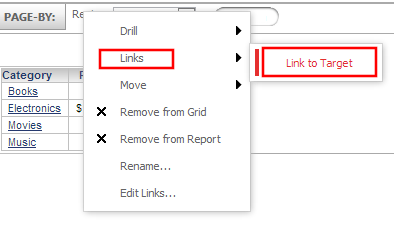
For users to access the link, it is required to right-click the page-by element and choose the link from the link section:
 

ka04W000000OgeCQAS_0EM4400000026l1.png

 
 Please note: No default link can be set for page-by links, links can only be accessed through the right-click context menu.


Comment

0 comments

Details

Knowledge Article

Published:

June 13, 2017

Last Updated:

June 13, 2017