EducationSoftwareStrategy.com
StrategyCommunity

Knowledge Base

Product

Community

Knowledge Base

TopicsBrowse ArticlesDeveloper Zone

Product

Download SoftwareProduct DocumentationSecurity Hub

Education

Tutorial VideosSolution GalleryEducation courses

Community

GuidelinesGrandmastersEvents
x_social-icon_white.svglinkedin_social-icon_white.svg
Strategy logoCommunity

© Strategy Inc. All Rights Reserved.

LegalTerms of UsePrivacy Policy
  1. Home
  2. Topics

KB42977: "Database server not found" error message appears when connecting to Sybase IQ on MicroStrategy 10.x


Community Admin

• Strategy


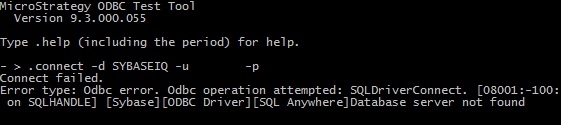
When connecting to a Sybase IQ database using MicroStrategy DB Query tool 10.x, the error "Database server not found" may be encountered.

SYMPTOM:
When connecting to a Sybase IQ database using Strategy DB Query tool 10.x, the error "Database server not found" may be encountered as shown below:
 

ka04W000000Ohe8QAC_0EM440000002JE7.jpeg

 
Additionally, it is confirmed that the 'DatabaseName' and 'CommLinks' parameters in the ODBC.ini file are correctly set.
 
CAUSE:
One possible cause is that the 'EngineName' parameter is set incorrectly in the odbc.ini file.
 
ACTION:
Confirm and correct the EngineName parameter in the odbc.ini file to resolve this error.  'EngineName' should be the name of the database server to connect to.
For additional details on setting up DSN to Sybase IQ, refer to the product manual, Strategy Installation and Configuration Guide > Connection to Databases: ODBC and DSNs


Comment

0 comments

Details

Knowledge Article

Published:

May 4, 2017

Last Updated:

May 4, 2017