Compatibility view is a setting introduced first in Internet Explorer 8 and available in newer versions, that allows for the browser to display as the old Internet Explorer 7 standards. This was introduced by Microsoft because some percentage of web pages coded to the behavior of older versions would break in Internet Explorer 8. Enabling compatibility view will often correct display problems like misaligned text, images, or text boxes.
Within Strategy Web 9.x and 10.x, this setting can affect the handling of JavaScript, CSS, and other types of files. The following images show how to find this Internet Explorer setting.
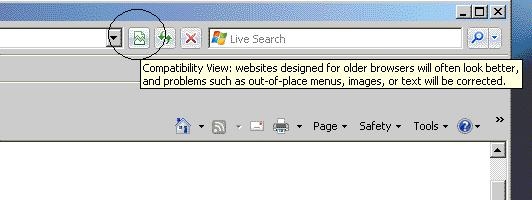
NOTE: For more information on Compatibility View mode refer to the following Microsoft page:
http://windows.microsoft.com/en-us/internet-explorer/products/ie-9/features/compatibility-view
How to verify if a page is rendered in Internet Explorer Compatibility View Mode?
The safest way to verify if a page is rendered in IE compatibility mode is to check the Browser and Document Mode in IE Developer Tools. To access Developer Tools either press the F12 key or go to Tools > F12 Developer Tools.


In IE 11 and EDGE Browsers ensure the browser profile is set to Desktop and not Enterprise mode under the emulation tab.
Enterprise Mode is a compatibility mode that runs on Internet Explorer 11 on Windows 8.1 Update and Windows 7 devices, this mode lets websites render using a modified browser configuration that’s designed to emulate either Windows Internet Explorer 7 or Windows Internet Explorer 8, avoiding the common compatibility problems associated with web apps written and tested on older versions of Internet Explorer.
In certain cases, the compatibility view mode icon may not show despite a site being in compatibility view mode. Mostly, this is due to Compatiblity View Settings, in particular "Display Intranet Sites in Compatibility Mode" which can be accessed through Tools > Compatibility View Settings.
Is Internet Explorer in Compatibility View Mode supported for Strategy Web 9.x and 10.x?
Strategy does not support compatibility View mode. It has not, and will not, undergo the certification process for support. Strategy only performs the certification process on the browsers in their native standards.
Therefore, an issue that does not occur in the regular Internet Explorer browser mode, but does occur in compatibility view mode, is not an issue that can be logged with the Strategy Technology department.
In some cases Strategy technical notes may suggest using compatibility view mode as a workaround to resolve a particular issue, but this is strictly a workaround, and not a solution as it is not a supported mode. If other issues arise as a result of implementing this workaround, the first step is to see if the issue remains while not in compatibility view and only the issues reproducible without compatibility view mode will be addressed.
Third Party Software Installation Warning: The third-party product(s) discussed in this technical note are manufactured by vendors independent of Strategy. Strategy makes no warranty, express, implied or otherwise, regarding these products, including their performance or reliability.
