EducationSoftwareStrategy.com
StrategyCommunity

Knowledge Base

Product

Community

Knowledge Base

TopicsBrowse ArticlesDeveloper Zone

Product

Download SoftwareProduct DocumentationSecurity Hub

Education

Tutorial VideosSolution GalleryEducation courses

Community

GuidelinesGrandmastersEvents
x_social-icon_white.svglinkedin_social-icon_white.svg
Strategy logoCommunity

© Strategy Inc. All Rights Reserved.

LegalTerms of UsePrivacy Policy
  1. Home
  2. Topics

KB43032: Drill Within results for a grid inside a dashboard displays the results in a new report if the user doesn't have the "Drill within Intelligent cube" privilege in MicroStrategy Web 9.x


Community Admin

• Strategy


Drill Within results for a grid inside a dashboard displays the results in a new report if the user doesn't have the "Drill within Intelligent cube" privilege in MicroStrategy Web 9.x

SYMPTOM:
 
In Strategy Web 9.x, the "drill within" option for grids inside documents will display the drilling results in a new report instead of showing them on the same dashboard, if the user doesn't have the "Drill within Intelligent cube" privilege from the Common Privileges group. This occurs even if the report is not based on a cube.
 
STEPS TO REPRODUCE:

  • Create a new dashboard, and add the Strategy Tutorial dataset Category Sales Report.
    Note: This report contains both Category and Subcategory attributes.
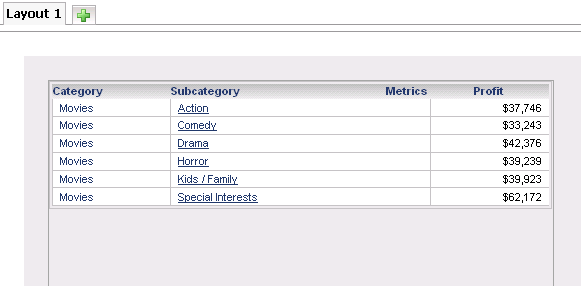
  • Add a grid with Category and Profit only.
ka04W000000Of10QAC_0EM4400000026jf.png
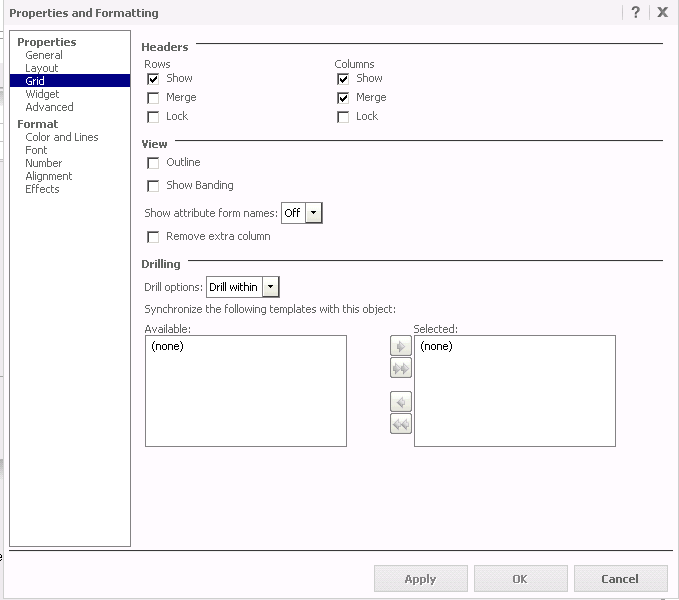
  • Right-click on the grid and select Properties and Formatting > Grid, and enable "Drill within" under the "Drilling" options.
ka04W000000Of10QAC_0EM4400000026jZ.png
  • Run the dashboard as a user who does not have: "Drill within Intelligent cube." 
  • Click on a Category element, which will open a new report.
ka04W000000Of10QAC_0EM4400000026jd.png
  • Clear document caches.
  • Run the dashboard as Administrator, and click on the Category elements to drill. This keeps the user inside the dashboard and is the expected behavior.
ka04W000000Of10QAC_0EM4400000026jj.png

CAUSE:
 
This is a known issue in Strategy Web 9.x and is related to the document cache.
 
For instance, if the user with the problem runs the drilling document first, and tries to drill, it immediately goes to a report. In the cache monitor in Strategy Desktop, notice a cache for the document has been created. If other users that do not experience the problem then try to drill after this, they will experience the same issue.
 
However, if the Administrator runs the document first when there is no document cache created yet, the user with the issue is able to drill within one level while still remaining in the same document. But after that, consecutive drills are redirected to a new report.
 
ACTION:
 
Contact Strategy Technical Support for an update on this case.
 
WORKAROUND:
 
Give the user the "Drill within Intelligent cube" privilege in Common Privileges.


Comment

0 comments

Details

Knowledge Article

Published:

June 15, 2017

Last Updated:

June 15, 2017