EducationSoftwareStrategy.com
StrategyCommunity

Knowledge Base

Product

Community

Knowledge Base

TopicsBrowse ArticlesDeveloper Zone

Product

Download SoftwareProduct DocumentationSecurity Hub

Education

Tutorial VideosSolution GalleryEducation courses

Community

GuidelinesGrandmastersEvents
x_social-icon_white.svglinkedin_social-icon_white.svg
Strategy logoCommunity

© Strategy Inc. All Rights Reserved.

LegalTerms of UsePrivacy Policy
  1. Home
  2. Topics

KB43051: How to set "Total" page-by element to display first when exporting a MicroStrategy Report Services Document to PDF


Community Admin

• Strategy


How to set "Total" page-by element to display first when exporting a Report Services Document to PDF in MicroStrategy

 
As described in Technical Note 42251, it is a known issue in Strategy 9.x that it cannot set "Total" page-by element to display first when exporting a Report Services Document to PDF. This technical note describes a workarount to achieve this requirement using consolidation.
 
For the steps below to achieve the requirement:
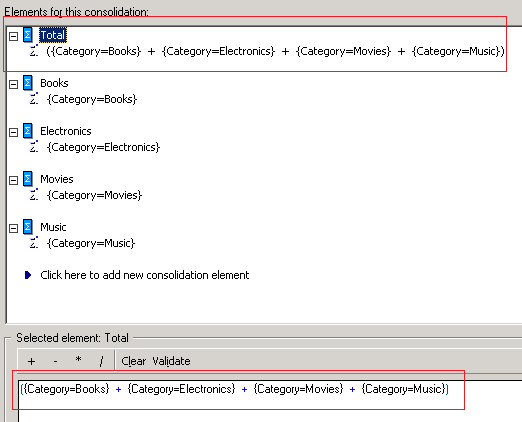
  • In Strategy Developer, create a consolidation with following definition:
ka04W000000uGCmQAM_0EM440000002CtK.png
  • NOTE: The first element of the consolidation is the aggregation of all the attribute elements. In other words, this is the "Total" element that is displayed first.
     
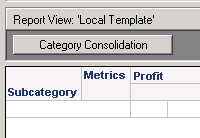
  • Create a new report with the "Category Consolidation" in Page-by, the attribute in row and the metric in column, as shown below:
ka04W000000uGCmQAM_0EM440000002CtD.png
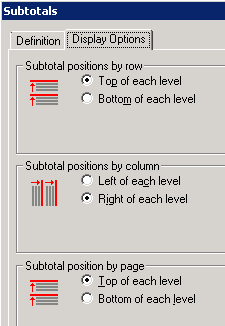
  • Go to Menu -> Data -> Subtotals, enable "Total". And the "Subtotal position by page" under Display Options tab is set to be "Top of each level", as shown below:
ka04W000000uGCmQAM_0EM440000002CtE.png
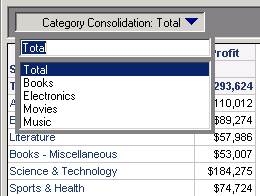
  • Run the report, and the Total is the first page-by element, as shown below:
ka04W000000uGCmQAM_0EM440000002CtF.jpeg
  • Save and close the report.
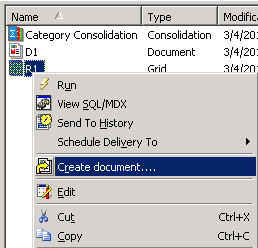
  • Right mouse click on the report -> Create document:
ka04W000000uGCmQAM_0EM440000002CtN.png
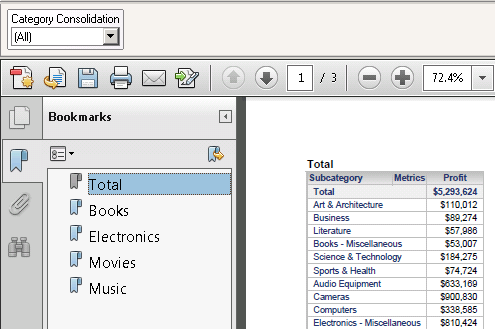
  • Export the document to PDF, and the Total page-by element is displayed as the first element, as shown below:
ka04W000000uGCmQAM_0EM440000002CtM.png


KB43051


Comment

0 comments

Details

Knowledge Article

Published:

June 8, 2017

Last Updated:

December 31, 2018