EducationSoftwareStrategy.com
StrategyCommunity

Knowledge Base

Product

Community

Knowledge Base

TopicsBrowse ArticlesDeveloper Zone

Product

Download SoftwareProduct DocumentationSecurity Hub

Education

Tutorial VideosSolution GalleryEducation courses

Community

GuidelinesGrandmastersEvents
x_social-icon_white.svglinkedin_social-icon_white.svg
Strategy logoCommunity

© Strategy Inc. All Rights Reserved.

LegalTerms of UsePrivacy Policy
  1. Home
  2. Topics

KB43057: Copying a transaction report shows blank names for the input objects in MicroStrategy Developer


Community Admin

• Strategy


Copying a transaction report shows blank names for the input objects in MicroStrategy Developer.

SYMPTOM
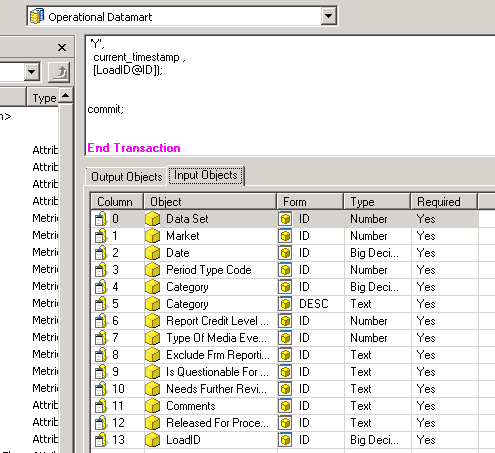
A transaction report consists of input and output objects in its freeform SQL definition, as shown:
ka04W000000uGChQAM_0EM440000002CsT.png

 
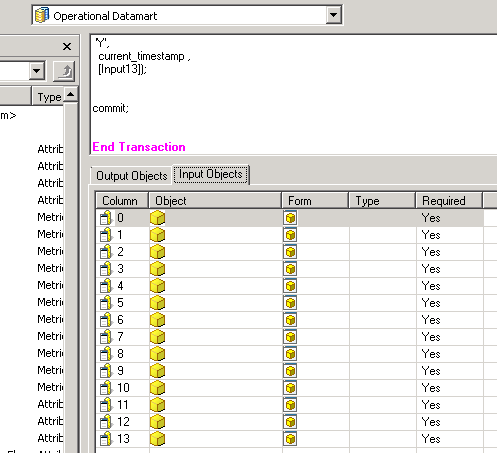
Consider that a copy of the report is made into a folder from Strategy Developer 9.4.1 and 10.x. On editing the copy from Strategy Developer 9.4.1 and 10.x and going to its freeform SQL definition, the input objects are seen to be blank, as shown:
ka04W000000uGChQAM_0EM440000002CsY.png

 
This behavior might be observed for only a few transaction reports. 
 
CAUSE
This is a known issue with Strategy Desktop Developer 9.4.1 and 10.x.
 
ACTION
Contact Strategy Technical Support for an update on the status of this issue.
 
WORKAROUND
The input objects can be entered again in the copy from Strategy Desktop Developer 9.4.1 and 10.x.
 
KB43057


Comment

0 comments

Details

Knowledge Article

Published:

May 31, 2017

Last Updated:

December 30, 2018