SYMPTOM:
After enabling the 'Do not Expire Cache' option for a report, a schedule must be selected to invalidate the cache. However, this cache may appear to be invalidated on a different schedule than what is selected. In order to enable the 'Do not Expire Cache' option for a specific report, it is necessary to first open a report in Strategy Developer 9.x. Once the report has loaded, from the overhead tool bar in Strategy Developer , navigate to Data > Report Caching Options.
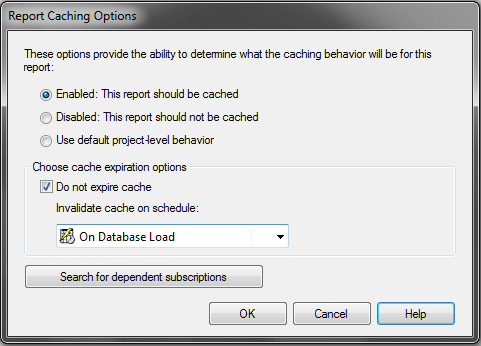
The 'Do not Expire cache' option is selected in this instance. It may appear that this report cache will only be invalidated on this selected schedule. However, administrative tasks may exist in this environment, which invalidate caches on a different schedule than what was selected.

The administrative task to invalidate caches must be at the project level, and must include this report if any filters are placed on the administrative task. After doing so, the behavior observed is that of the report cache being invalidated on two schedules.
CAUSE:
The created administrative task to invalidate caches is not aware of the 'Do not Expire Cache' option selected at the report level. This is currently working as designed as the 'Do not Expire Cache' option is to prevent the expiration settings determined at the project level to take effect. The 'Do not Expire Cache' setting does not prevent invalidation.
ACTION:
An enhancement has been logged to have another option at the report level to prevent invalidation from administrative tasks. Contact Strategy Technical Support for an update on this enhancement.
WORKAROUND:
If it is necessary to use the 'Do not Expire Cache' option at the report level, and have administrative tasks to invalidate caches in the environment, the administrative tasks must be based upon criteria which will exclude the report in question. For more information on this functionality, refer to the following Strategy Knowledge Base technical note:
TN: 16662: "Recommendations for invalidating report caches in Strategy Intelligence Server 9.x "
