SYMPTOM:
Expired report caches still remain in the DSSCSCONTENT table after they are no longer needed. These report caches cannot be removed after running the Administrative Tasks "Clean History List Database" or "Delete History List Messages." The unnecessary excess data in the DSSCSCONTENT table can then cause issues with the history list database running out of space.
CAUSE:
Starting in Strategy 9.2.0, the DSSCSRPTCACH table was introduced as a dedicated table to store report caches only. In previous versions all the Strategy objects related to History list caches management (including report caches) were stored in the DSSCSCONTENT table.
During the upgrade of the History List Repository, if the option "Copy History List content" is unchecked as shown below, then the History List management mechanism will recognize the fact that there are report caches that are contained in the DSSCSCONTENT table and will use the new table DSSCSRPTCACH for all newly created report caches.
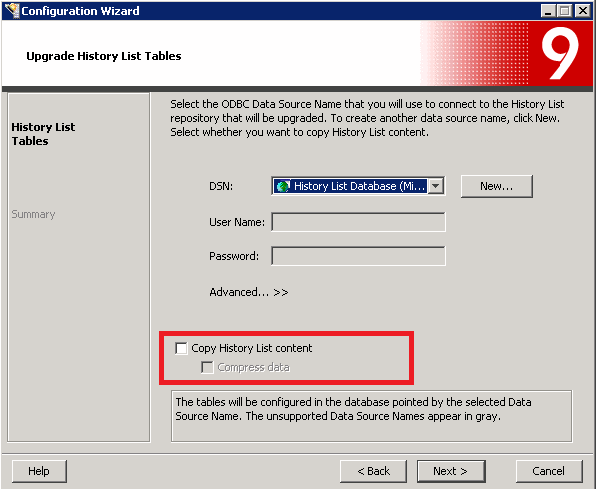
The History List management mechanism will continue to use the existing report caches in the DSSCSCONTENT table until all of the existing report caches in the DSSCSCONTENT tables are expired. After the report caches used in the DSSCSCONTENT table are expired they will be removed through the Administrative Task "Delete History List Messages." If the history list messages have been manually deleted from the DSSCSMSGINFO table then there will be no association back to the report caches in the DSSCSCONTENT table, therefore they will not be deleted by Administrative Tasks.
ACTION:
If the DSSCSCONTENT table contains rows with SUB_ID 2048 (report cache) verify to see how many report caches are no longer being used by history list messages by running the follow query:
SELECT COUNT(CONTENT_ID) FROM DSSCSCONTENT WHERE SUB_ID = 2048 AND CONTENT_ID NOT IN (SELECT(RESULT_ID) FROM DSSCSMSGINFO);
If the value returns something other than zero then there remains report caches in the DSSCSCONTENT table that are no longer needed.
To delete these rows run the query:
DELETE FROM DSSCSCONTENT WHERE SUB_ID = 2048 AND CONTENT_ID NOT IN (SELECT(RESULT_ID) FROM DSSCSMSGINFO);
Repository Modification (History List Repository):
WARNING:
Manually editing values in the Strategy History List Repository incorrectly may cause serious, project-wide problems that may make your project unusable. Since these are user-initiated changes, they are not covered by any Strategy warranty. Users are strongly encouraged to backup the Strategy History List Repository prior to any alteration.
