EducationSoftwareStrategy.com
StrategyCommunity

Knowledge Base

Product

Community

Knowledge Base

TopicsBrowse ArticlesDeveloper Zone

Product

Download SoftwareProduct DocumentationSecurity Hub

Education

Tutorial VideosSolution GalleryEducation courses

Community

GuidelinesGrandmastersEvents
x_social-icon_white.svglinkedin_social-icon_white.svg
Strategy logoCommunity

© Strategy Inc. All Rights Reserved.

LegalTerms of UsePrivacy Policy
  1. Home
  2. Topics

KB43128: The page-by field does not show when exporting to PDF from MicroStrategy Developer 9.x and 10.x


Stefan Zepeda

Salesforce Solutions Architect • Strategy


The page-by field does not show when exporting to PDF from MicroStrategy Developer 9.x and 10.x

The page-by field does not show when exporting to PDF from Strategy Developer 9.x and 10.x
STEPS TO REPRODUCE: 
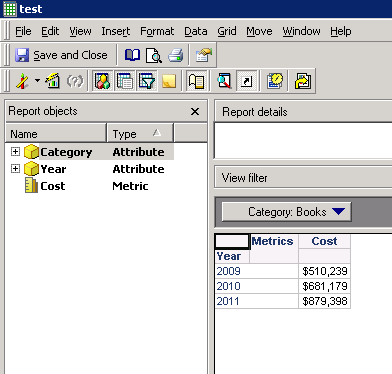
  1. Create a report with attribute Year and metric Cost. Add attribute Category in page-by as below:
ka02R000000kb9pQAA_0EM440000002Csh.png


  • Export the report to PDF, and there is no page-by field shown as below:
ka02R000000kb9pQAA_0EM440000002Css.png

CAUSE:
One possible cause is that the page-by field doesn't include in the report header.
ACTION:
Follow below steps to add page-by field to the header:

  1. Go to Data>Export Option and select PDF file as the Application. Click Advanced Options as below:
ka02R000000kb9pQAA_0EM440000002Csf.png


  • Under the Header/Footers tab, insert auto-text for page-by as below: 
ka02R000000kb9pQAA_0EM440000002Csk.png


Comment

0 comments

Details

Knowledge Article

Published:

May 31, 2017

Last Updated:

March 26, 2018