EducationSoftwareStrategy.com
StrategyCommunity

Knowledge Base

Product

Community

Knowledge Base

TopicsBrowse ArticlesDeveloper Zone

Product

Download SoftwareProduct DocumentationSecurity Hub

Education

Tutorial VideosSolution GalleryEducation courses

Community

GuidelinesGrandmastersEvents
x_social-icon_white.svglinkedin_social-icon_white.svg
Strategy logoCommunity

© Strategy Inc. All Rights Reserved.

LegalTerms of UsePrivacy Policy
  1. Home
  2. Topics

KB43141: How to send emails without double quotes around the "From" field in MicroStrategy Intelligence Server 9.x


Community Admin

• Strategy


When emails are sent via Distribution Services in Strategy 9.x, the "From" field displays the address name in double-quotes as shown below:
 
From: "Strategy Distribution Services"<DistService@MSTR.com>
To: "User A" <UserA@domain.com">
Date: Friday, March 29, 2013 at 11:59 AM
Subject: Distribution Services Report
 
In order to send emails without double-quotes around the "From" field, follow the steps outlined below:
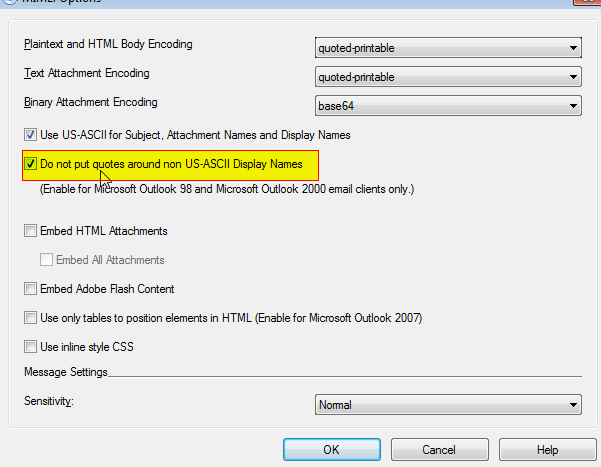
  • Edit the device in use to send emails (Default - Generic Email).
  • Select MIME and click on Options in the dialog box.
  • Check the option "Do not put quotes around non US-ASCII Display Names" as shown below.
     
ka04W000000OgppQAC_0EM4400000029bW.png
  • Click OK. 

This will result in the following:
 
From: Strategy Distribution Services<DistService@MSTR.com>
To: "User A" <UserA@domain.com">
Date: Friday, March 29, 2013 at 11:59 AM
Subject: Distribution Services Report


Comment

0 comments

Details

Knowledge Article

Published:

June 8, 2017

Last Updated:

June 8, 2017