EducationSoftwareStrategy.com
StrategyCommunity

Knowledge Base

Product

Community

Knowledge Base

TopicsBrowse ArticlesDeveloper Zone

Product

Download SoftwareProduct DocumentationSecurity Hub

Education

Tutorial VideosSolution GalleryEducation courses

Community

GuidelinesGrandmastersEvents
x_social-icon_white.svglinkedin_social-icon_white.svg
Strategy logoCommunity

© Strategy Inc. All Rights Reserved.

LegalTerms of UsePrivacy Policy
  1. Home
  2. Topics

KB43212: Where is the Default Location of odbctrace.out and How to Change it with MicroStrategy Intelligence Server?


Community Admin

• Strategy


This KB addresses where to find the ODBC trace output file and how to change the location it is created in.

QUESTION:
ODBC Trace may be suggested to be enabled for troubleshooting some issues that require ODBC level analysis. For more information about this trace and how to enable it, please refer to: 

  • KB11979: How to turn on/turn off ODBC tracing in MicroStrategy Intelligence Server Universal 9.x - 10.x

The default value for TraceFile location is: 
TraceFile=odbctrace.out
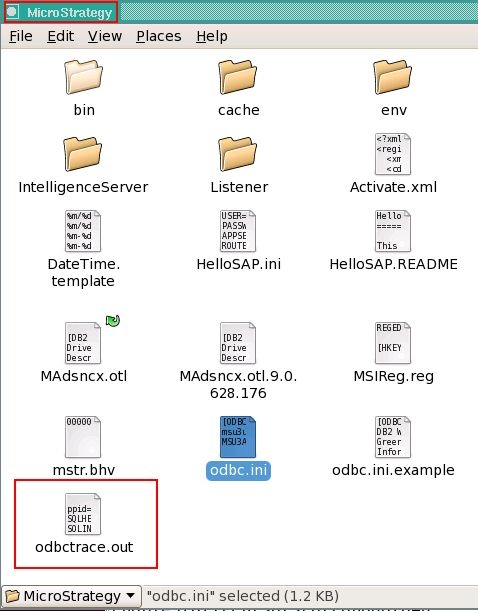
Where will this file be generated?
ANSWER:
The file can be found on the same directory where odbc.ini file exists. By default, it is under the Strategy folder of the Unix machine where the Intelligence Server is installed.
ka04W00000148MLQAY_0EM440000002HIQ.jpeg

 
If needed, the path can be changed in odbc.ini file:
Sample Code/Error:


Trace=1
TraceFile=AnotherFolderName/odbctrace.out
TraceDll=/opt/MicroStrategy/lib32/odbctrac.so
InstallDir=/opt/Strategy
IANAAppCodePage=106
UseCursorLib=0


Comment

0 comments

Details

Knowledge Article

Published:

April 11, 2017

Last Updated:

April 11, 2017