EducationSoftwareStrategy.com
StrategyCommunity

Knowledge Base

Product

Community

Knowledge Base

TopicsBrowse ArticlesDeveloper Zone

Product

Download SoftwareProduct DocumentationSecurity Hub

Education

Tutorial VideosSolution GalleryEducation courses

Community

GuidelinesGrandmastersEvents
x_social-icon_white.svglinkedin_social-icon_white.svg
Strategy logoCommunity

© Strategy Inc. All Rights Reserved.

LegalTerms of UsePrivacy Policy
  1. Home
  2. Topics

KB43216: "String in context 'Object Name' of Search object " with id 'xxx' cannot exceed the maximum length of 250 characters" error appears in MicroStrategy 9.4.1 when doing a search on an object that has a length is at or just under 250 characters.


Stefan Zepeda

Salesforce Solutions Architect • Strategy


"String in context 'Object Name' of Search object " with id 'xxx' cannot exceed the maximum length of 250 characters" error appears in MicroStrategy 9.4.1 when doing a search on an object that has a length is at or just under 250 characters.

SYMPTOM:
When trying to search for the dependents or components of an object who has a length of 250 characters or just under, the following error will show:
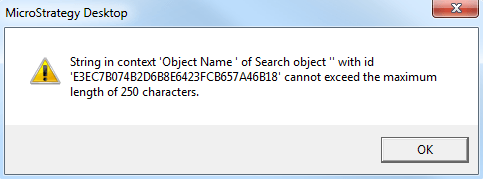
ka02R000000kXGSQA2_0EM440000002CrW.png

Sample Code/Error
String in context 'Object Name' of Search object " with id 'xxx' cannot exceed the maximum length of 250 characters.
CAUSE:
This is a known issue in Strategy Developer 9.4.1
ACTION:
Temporarily rename the object to a shorter character length and then perform the search.


Comment

0 comments

Details

Knowledge Article

Published:

June 19, 2017

Last Updated:

June 19, 2017