EducationSoftwareStrategy.com
StrategyCommunity

Knowledge Base

Product

Community

Knowledge Base

TopicsBrowse ArticlesDeveloper Zone

Product

Download SoftwareProduct DocumentationSecurity Hub

Education

Tutorial VideosSolution GalleryEducation courses

Community

GuidelinesGrandmastersEvents
x_social-icon_white.svglinkedin_social-icon_white.svg
Strategy logoCommunity

© Strategy Inc. All Rights Reserved.

LegalTerms of UsePrivacy Policy
  1. Home
  2. Topics

KB43258: "Object with ID XXXX and type 26 (Column) is not found in metadata. It may have been deleted" error appears when trying to open Warehouse Catalog in MicroStrategy Developer


Stefan Zepeda

Salesforce Solutions Architect • Strategy


"Object with ID XXXX and type 26 (Column) is not found in metadata. It may have been deleted" error appears when trying to open Warehouse Catalog in MicroStrategy Developer

SYMPTOM

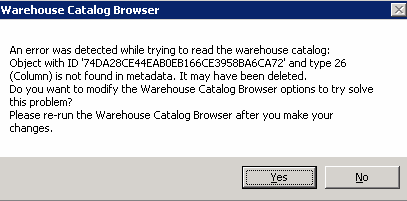
When trying to access a project Warehouse Catalog, the following error appears in Strategy Developer 9.4.1, 10.x, or 2019:
ka04W000001IsMkQAK_0EM440000002Cr2.png


An error was detected while trying to read the warehouse catalog:
Object with ID xxxx and type 26 (Column) is not found in metadata. It may have been deleted

If clicking "Yes", user will access the Warehouse Catalog but will be unable to save their changes.

CAUSE

This issue occurs because at least one of the DB Tables contains a reference to a missing column.

ACTION

In order to remove that wrong reference, run ScanMD Schema Common Tests against the project, by following the instructions provided in the Knowledge Base Article below:
https://community.strategy.com/article/Using-ScanMD-to-fix-known-logical-metadata-inconsistencies-in-the-MicroStrategy-Product-in-MSTR-2019?language=en_US
Contact Strategy Technical Support if the issue persists after running ScanMD.


Comment

0 comments

Details

Knowledge Article

Published:

May 30, 2017

Last Updated:

May 2, 2019