Metric dimensionality is crucial in determining what goes into the mini-reports. Metric editor shows dimensionality targets in curly braces { }. To show the Dimensionality notation, click the menu View > Show Level (Dimensionality) Properties as shown below:
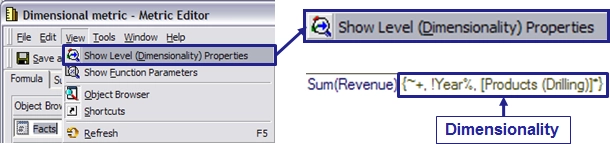
This exposes characters describing the grouping and filtering properties.
Take below metric dimensionality for example, the correspond Dimensionality notation is {~+, !Year%, [Products (Drilling)]*}
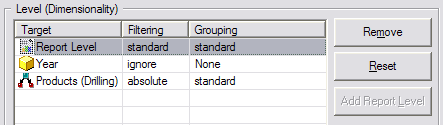
Symbol definitions:
Target is given by name (Year, [Products (Drilling)])
~ = Report Level
Grouping = Before Target
<nothing> = Standard
! = None
Grouping is Before Target
<nothing> = Standard
! = None
Filtering = After Target
+ = Standard
* = Absolute
% = Ignore
<nothing> = None
For {~+, !Year%,[Products (Drilling)]*}, the Filtering setting for Products (Drilling) is Absolute; the filtering and grouping for Report Level is Standard, standard; the filtering and grouping for Year is Ignore, None.
