SUMMARY:
Strategy 9.3.0 introduces new installer for installations on Unix/Linux operating system platforms. The older InstallShield based installer is retired, and a s a result, the vpd.properties file which was used to track previous installations is replaced by a new file created in the installing users $HOME folder called mstrinstalls.xml.
Refer to Technical Documents below for more details of the new installer:
KB42274 --- New feature in Strategy Universal 9.3.0: Uninstall Hotfix from existing Linux/Unix environment
KB42275 --- New feature in Strategy Universal 9.3.0: Change/add/remove specific features & components on existing Linux/Unix installations
KB42406 --- The vpd.properties file is replaced by mstrinstalls.xml for Unix/Linux installations in Strategy 9.3.0
For users experiencing issues with installation on Unix/Linux, the following steps can be used to enable additional logging for troubleshooting problems with the Installer prior to the install.log file creation.
1. Navigate to the installation files folder
2. Run the installer with a –debug flag (i.e. setup.sh –debug in Linux) in order to generate an additional log with more details; the installer window pop up once the file integrity check is done as shown below:
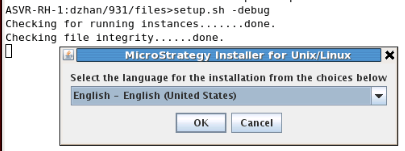
3. MSTRInstaller.log is generated in the home folder of the user who performed the installation.
<user_home>/MSTRInstaller.log
4. The MSTRInstaller.log contains entries like below:
Sample Code/Error
============================================================================================================
: Advanced Logging initialized successfully.
============================================================================================================
: Initializing Installer environment...
: Loading options file: /home/dzhan/931
/files/options.txt
: Line " system" is invalid an
d will be ignored.
========================================
Arguments loaded for installation:
For pre-9.3.x version installations, users may refer to Technical Note below:
KB13916 --- How to enable additional logging to troubleshoot issues with the Strategy Universal Installer 9.x
