EducationSoftwareStrategy.com
StrategyCommunity

Knowledge Base

Product

Community

Knowledge Base

TopicsBrowse ArticlesDeveloper Zone

Product

Download SoftwareProduct DocumentationSecurity Hub

Education

Tutorial VideosSolution GalleryEducation courses

Community

GuidelinesGrandmastersEvents
x_social-icon_white.svglinkedin_social-icon_white.svg
Strategy logoCommunity

© Strategy Inc. All Rights Reserved.

LegalTerms of UsePrivacy Policy
  1. Home
  2. Topics

KB43281: Error "Cannot write configuration file" appears when trying to enable Anonymous Authentication for MicroStrategy Web application in IIS in Microsoft Windows Server 2008


Community Admin

• Strategy


Get "Cannot write configuration file" error when trying to enable Anonymous Authentication for MicroStrategy Web application in IIS

SYMPTOM:
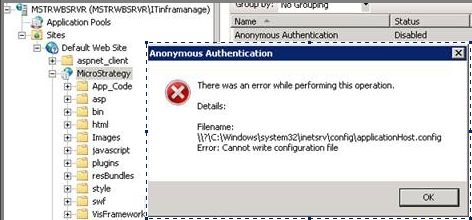
When trying to enable Anonymous Authentication for Strategy Web application in IIS in Microsoft Windows Server 2008, the below error appears:
 

ka04W000001MKqvQAG_0EM4400000026gc.jpeg

 
Sample Code/Error
There was an error while performing this operation.
Detail:
File name:
\\?\C:\Windows\system32\inetsrv\config\application.config">\\?\C:\Windows\system32\inetsrv\config\application.config
Error: Cannot write configuration file
 
CAUSE:
Insufficient disk space in local disk (C:\) in Windows server machine.
 
ACTION:
Free up some space in local disk (C:\) in Windows server machine and perform the configuration again.
 
Third Party Software WARNING:
The third-party product(s) discussed in this technical note is manufactured by vendors independent of Strategy. Strategy makes no warranty, express, implied or otherwise, regarding this product, including its performance or reliability.


Comment

0 comments

Details

Knowledge Article

Published:

April 6, 2017

Last Updated:

April 6, 2017