EducationSoftwareStrategy.com
StrategyCommunity

Knowledge Base

Product

Community

Knowledge Base

TopicsBrowse ArticlesDeveloper Zone

Product

Download SoftwareProduct DocumentationSecurity Hub

Education

Tutorial VideosSolution GalleryEducation courses

Community

GuidelinesGrandmastersEvents
x_social-icon_white.svglinkedin_social-icon_white.svg
Strategy logoCommunity

© Strategy Inc. All Rights Reserved.

LegalTerms of UsePrivacy Policy
  1. Home
  2. Topics

KB43309: How to change the order that the SQL Engine writes filtering conditions into the WHERE clause in MicroStrategy?


Stefan Zepeda

Salesforce Solutions Architect • Strategy


This article notes how to change the order of filters in MicroStrategy

 
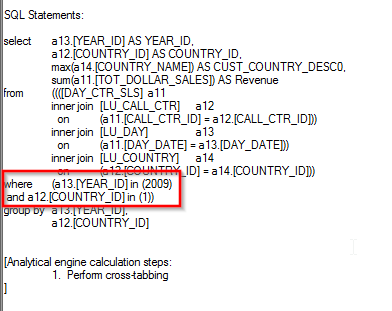
In certain scenarios it may be required to set the order that filtering conditions appear in the SQL WHERE clause.  This can be done by rearranging the filtering definitions in the Report Filter itself.  Filtering conditions higher up in the Report Filter will be placed in the SQL before filtering conditions lower down.  As an example, consider the following SQL which has filtering conditions on both Year and Country:
 

ka02R000000kcFNQAY_0EM440000002CqK.png

 
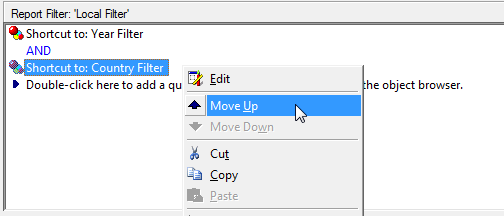
Note that the Year filtering condition comes before the Country filtering condition in the SQL.  This is because the Year filter is placed higher in the Report Filter than the Country filter as seen in the following screenshot.  The order can be rearranged by right-clicking a condition and using the "Move Up" and "Move Down" options as seen in the screenshot as well.
 

ka02R000000kcFNQAY_0EM440000002CqX.png

Comment

0 comments

Details

Knowledge Article

Published:

May 17, 2017

Last Updated:

May 17, 2017