SYMPTOM:
Custom format with more than 4 conditionals displays incorrectly in a report in Strategy.
The following steps demonstrate how to reproduce the issue in tutorial project:
1. Create a table with data as shown below:
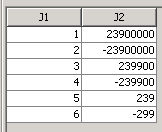
2. Import this table into tutorial project and create an attribute "J1" and fact "J2" mapping to the two columns, respectively. Create a metric "J2" with this fact.
3. In metric editor in Developer, set custom format with expression as shown below:
[<=-1000000]("$"0.00,,"M")[RED];[<=-1000]("$"0.00,"K")[RED];[<0]("$"0)[RED];[>=1000000]"$"0.00,,"M";[>=1000]0.00,"K";"$"0
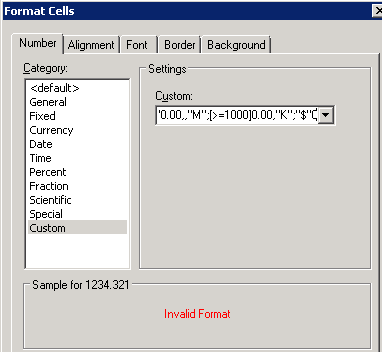
4. The expression cannot be validated successfully in Developer as shown below:
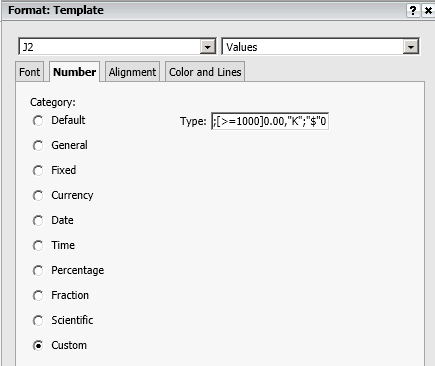
5. In Web, create a report with attribute J1 and metric J2. In Advanced Formatting, set custom format for J2 with same expression as Developer. The expression in Web can be validated successfully as shown below:
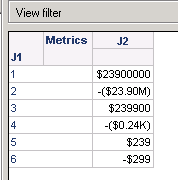
6. The report in Web cannot display correct format for the last two conditionals as shown below:
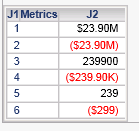
“239900” and “239”should be “$239.90K” and “$239”.
7. The report in Developer cannot display correct format as shown below:
CAUSE:
This is a known issue in Strategy 10.x. Currently, there are only four conditionals supported by Strategy custom format feature.
ACTION:
Currently this issue is still being reviewed for feasibility by our Technology team and it is not scoped for any upcoming scheduled Strategy release.
