SYMPTOM:
Users may come across a requirement to create a consolidation or custom group that contains a null row. This is possible in Strategy Developer 9.4.1 and 10.x.
ACTION:
1. Create a new consolidation.
2. Add desired consolidation elements, for example ({Year=2008"} + {"Year=2009"} + and {"Year=2010"}).
3. Add a new consolidation element that will be the null row.
4. Give the new consolidation element any name and any definition.

5. Right click the consolidation element and select Formatting Properties > Element Headers

6. In the Format Cells window, select the font tab
7. Change the font color to white

8. Right click the consolidation element and select Formatting Properties > Element Values

9. Repeat steps 6-7 for the Element Values
10. If the consolidation is added to a report with a metric, the consolidation element will display a null row as seen below.
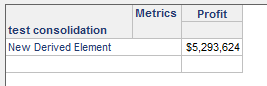
11. The above steps also apply for a Custom Group.
KB43325
