EducationSoftwareStrategy.com
StrategyCommunity

Knowledge Base

Product

Community

Knowledge Base

TopicsBrowse ArticlesDeveloper Zone

Product

Download SoftwareProduct DocumentationSecurity Hub

Education

Tutorial VideosSolution GalleryEducation courses

Community

GuidelinesGrandmastersEvents
x_social-icon_white.svglinkedin_social-icon_white.svg
Strategy logoCommunity

© Strategy Inc. All Rights Reserved.

LegalTerms of UsePrivacy Policy
  1. Home
  2. Topics

KB43326: How to create an empty subtotal for a metric in MicroStrategy 9.x?


Stefan Zepeda

Salesforce Solutions Architect • Strategy


How to create an empty subtotal for a metric in MicroStrategy 9.x?

SYMPTOM:
 
The user would like to create a metric that displays an empty subtotal.
 
STEPS TO REPRODUCE:
 
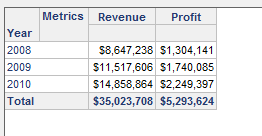
1. Create a report with the Year attribute and the Profit and Revenue metrics
 

ka02R000000kbfHQAQ_0EM440000002Cqa.png

 
2. Edit the Revenue metric
3. In the Subtotals/Aggregation tab, change the Total Subtotal Function to none
 

ka02R000000kbfHQAQ_0EM440000002CqZ.png

 
4. The report with now display double dashes "--" for the subtotal
 

ka02R000000kbfHQAQ_0EM440000002CqJ.png

 
5. If the user would like to remove the double dashes, Select Data > Report Data Options in the report
 

ka02R000000kbfHQAQ_0EM440000002Cqb.png

 
6. In the Report Data Options window, select Display > Null Values
7. In the Aggregation Nulls field, uncheck Use Default and delete the double dashes
 

ka02R000000kbfHQAQ_0EM440000002Cqd.png

 
8. The report will now display an empty cell for the subtotal
 

ka02R000000kbfHQAQ_0EM440000002CqI.png


Comment

0 comments

Details

Knowledge Article

Published:

June 12, 2017

Last Updated:

June 12, 2017