EducationSoftwareStrategy.com
StrategyCommunity

Knowledge Base

Product

Community

Knowledge Base

TopicsBrowse ArticlesDeveloper Zone

Product

Download SoftwareProduct DocumentationSecurity Hub

Education

Tutorial VideosSolution GalleryEducation courses

Community

GuidelinesGrandmastersEvents
x_social-icon_white.svglinkedin_social-icon_white.svg
Strategy logoCommunity

© Strategy Inc. All Rights Reserved.

LegalTerms of UsePrivacy Policy
  1. Home
  2. Topics

KB43360: While schema object is opened by a user who does not have a privilege to edit it, Administrator user is unable to edit the schema object with MicroStrategy Developer 9.x - 10.x.


Stefan Zepeda

Salesforce Solutions Architect • Strategy


This technical note describes a behavior observed where a schema object is opened by a user who does not have a privilege to edit it

SYMPTOM:
An Administrator user is unable to edit a table when there is another user who is viewing Table with Read-only mode. For more information about expected behavior with concurrent schema object editing, refer to:
KB17418: ‘The schema is being modified by Administrator’ message appears when attempting to edit a schema object in MicroStrategy Developer9.4.x-10.x -
 
STEPS TO REPRODUCE:
Execute the following in Strategy Tutorial:
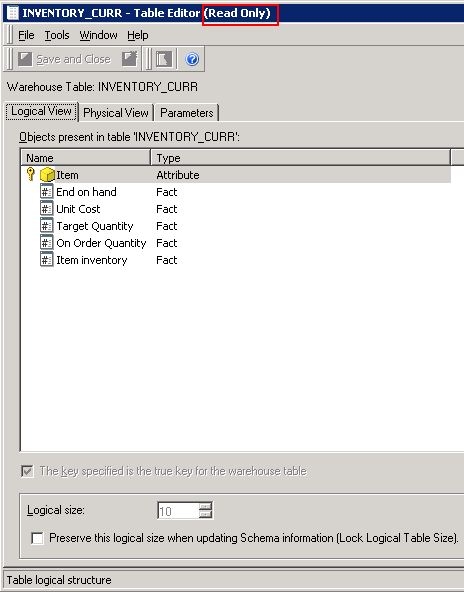
  • Create a user who's ACL is set to "View" for Tables folder under Schema Objects folder, and all privilege under Desktop Designer and Desktop Analyst.
  • Login to the project as the user and open one of the table object --> This will allow the user to view table in read-only without giving any option.
     
ka04W000001IqOZQA0_0EM440000002Com.jpeg
  • While the user remained logged in the project, launch another Desktop instance and login as "Administrator" who had all the privileges including bypass all object security.
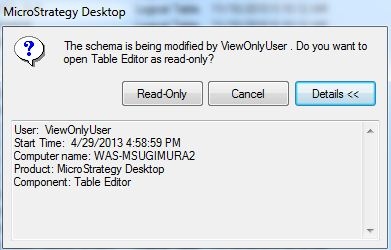
  • Notice a pop-up message saying,


    The schema is being modified by ViewOnlyUser. Do you want to open Table Editor as read-only?


ka04W000001IqOZQA0_0EM440000002Cog.jpeg
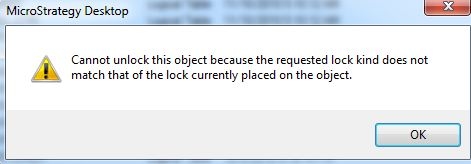
  • When trying to unlock the schema, the Administrator receives the following error.
    
    Cannot unlock this object because the requested lock kind does not match that of the lock currently placed on the object.


ka04W000001IqOZQA0_0EM440000002Cok.jpeg

 
* If the user who login to the project first had a privilege to edit the table object and chose to open the table in read-only mode, then, Administrator user logged in later from another Desktop Instance can edit the table without any issue.
 
 
CAUSE:
This is a known issue with Strategy Developer 9.x - 10.x.
 
 
ACTION:
Strategy is investigating this issue and will continue posting updates as soon as they become available.
 
WORKAROUND:
Revoke view access to schema objects from the users who does not need to edit them.


Comment

0 comments

Details

Knowledge Article

Published:

June 16, 2017

Last Updated:

June 16, 2017