EducationSoftwareStrategy.com
StrategyCommunity

Knowledge Base

Product

Community

Knowledge Base

TopicsBrowse ArticlesDeveloper Zone

Product

Download SoftwareProduct DocumentationSecurity Hub

Education

Tutorial VideosSolution GalleryEducation courses

Community

GuidelinesGrandmastersEvents
x_social-icon_white.svglinkedin_social-icon_white.svg
Strategy logoCommunity

© Strategy Inc. All Rights Reserved.

LegalTerms of UsePrivacy Policy
  1. Home
  2. Topics

KB43367: Prompt report execution stuck in state of processing request after re-prompted in MicroStrategy Web.


Community Admin

• Strategy


Prompt report execution stuck in state of processing request after re-prompted in MicroStrategy Web.

SYMPTOM:
 
In Web 9.4.1 and 10.x, run a prompted report. After answering the prompt and click 'Run', an error appears.
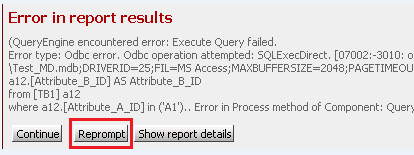
ka04W000000Ods6QAC_0EM4400000026gE.png

 
Then click Re-prompt, it does not show the same error and stays in state of "Processing request" instead of returning error message.
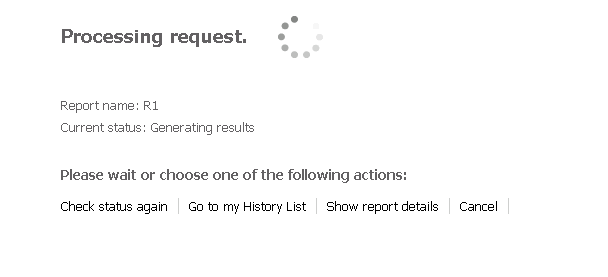
ka04W000000Ods6QAC_0EM4400000026gA.png

 
STEPS TO REPRODUCE:

  • Create two sample warehouse databases.
    'Warehouse1' includes one table that includes two columns 'ColumnA' and 'ColumnB'.
    'Warehouse2' includes one table that only includes 'Column B' which is as same as the one in Warehouse2.
     
  • Create a Database Instance connecting to 'Warehouse1'.
  • Create two attributes 'AttributeA' and 'AttributeB' based from 'ColumnA' and 'ColumnB'.
  • Create a report with 'AttributeA' and 'AttributeB' and insert an attribute element prompt as filter on 'AttributeA'.
  • Change Database Instance definition by redirecting the connection to Warehouse2.
  • Update schema.
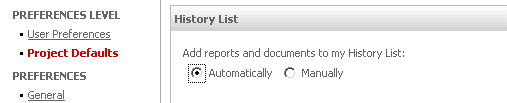
  • In Web, go to Project Preferences, under History List, select "Automatically" for option "Add reports and documents to my History List" .
     
ka04W000000Ods6QAC_0EM4400000026g9.png
  • Run the report in Web, answer the element prompt and click 'Run'. Error message returns.
  • Click 'Re-prompt', it will keep in state of processing all the time.


CAUSE:
This is a known issue in Strategy Web 9.4.1 and 10.x
 
ACTION:
Strategy will continue to investigate and post updates as soon as they are available.
 
WORKAROUND:
In Web, go to Project Preferences, under History List, select "Manually" for option "Add reports and documents to my History List".


Comment

0 comments

Details

Knowledge Article

Published:

June 15, 2017

Last Updated:

June 15, 2017