EducationSoftwareStrategy.com
StrategyCommunity

Knowledge Base

Product

Community

Knowledge Base

TopicsBrowse ArticlesDeveloper Zone

Product

Download SoftwareProduct DocumentationSecurity Hub

Education

Tutorial VideosSolution GalleryEducation courses

Community

GuidelinesGrandmastersEvents
x_social-icon_white.svglinkedin_social-icon_white.svg
Strategy logoCommunity

© Strategy Inc. All Rights Reserved.

LegalTerms of UsePrivacy Policy
  1. Home
  2. Topics

KB43393: Unknown Flag objects called "NewSearch Folder" show up in a project in MicroStrategy 9.x - 10.x.


Community Admin

• Strategy


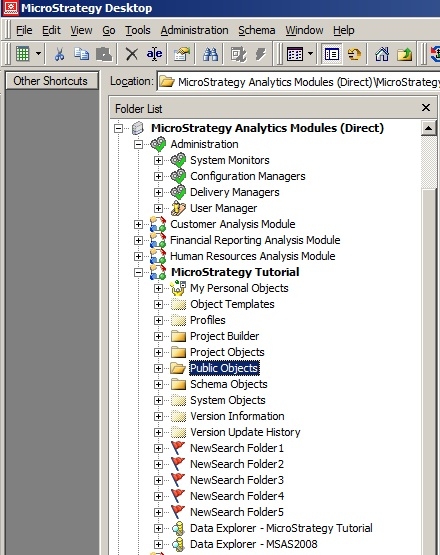
This Technical Note describe an issue that occur in MicroStrategy developer where Unknown Flag objects called "NewSearch Folder" show up in a project. These show up immediately underneath the project and if expanded show lists of varying objects. They also only show up after a Project Merge occurred where some issue happened during the merge.

SYMPTOM:
A Flag object shows up in Desktop with a name like NewSearch Folder like in the below image.
ka04W000001MKtKQAW_0EM440000002CqW.jpeg

 
These show up immediately underneath the project and if expanded show lists of varying objects. They also only show up after a Project Merge occurred where some issue happened during the merge.
 
CAUSE:
One known cause for this is that a Project Merge was attempted with the project in question as the source project. During this Project Merge either Developer, the Intelligence Server or the database server crashed. What happens is that these objects are temporarily created during the process of Project Merge and are supposed to be deleted once it completes. They are integral to the process of a Project Merge.
 
ACTION:
These objects are associated with a failed Project Merge and can be safely deleted without having any effect on the project in question.


Comment

0 comments

Details

Knowledge Article

Published:

April 4, 2017

Last Updated:

April 4, 2017