EducationSoftwareStrategy.com
StrategyCommunity

Knowledge Base

Product

Community

Knowledge Base

TopicsBrowse ArticlesDeveloper Zone

Product

Download SoftwareProduct DocumentationSecurity Hub

Education

Tutorial VideosSolution GalleryEducation courses

Community

GuidelinesGrandmastersEvents
x_social-icon_white.svglinkedin_social-icon_white.svg
Strategy logoCommunity

© Strategy Inc. All Rights Reserved.

LegalTerms of UsePrivacy Policy
  1. Home
  2. Topics

KB43418: “Unexpected case inside switch statement of resolution” error message appears when saving a report that uses the new dynamic prompt metric aliasing in MicroStrategy Web


Community Admin

• Strategy


This issue has been classified as working as designed by MicroStrategy. The impact is limited to MicroStrategy Web 9.3.0 product only with reports using dynamic prompt metric aliasing.

SYMPTOM:
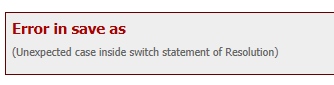
When trying to use the new dynamic prompt metric aliasing in Strategy Web and saving the report, following error occurs:


“Unexpected case inside switch statement of resolution”
  
STEPS TO REPRODUCE:
Execute the following in Strategy Tutorial:

  • Create a nested prompt and place it on a report
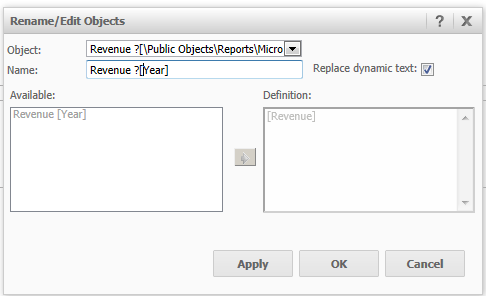
  • Rename one of the metrics with the following syntax: ?
ka04W00000147q1QAA_0EM4400000026EV.png
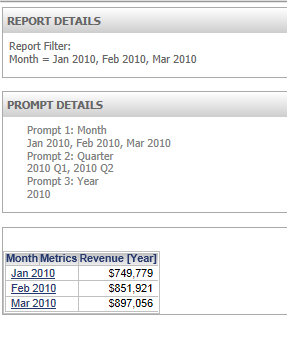
  • Click OK and run report. Notice that the metric name is not resolved.                                                                                      
ka04W00000147q1QAA_0EM4400000026EU.png
  • Save report and the error occurs                                                                                                                      
ka04W00000147q1QAA_0EM4400000026EW.png

CAUSE:
This is working by design. The prompt object being specified in the syntax must be a standalone prompt rather than an embedded prompt as the metric alias searches for a prompt path and since embedded prompts do not have a physical path, the error occurs. 
 
ACTION:
Create a standalone prompt object and select this prompt for the filter when creating the nested prompt.


Comment

0 comments

Details

Knowledge Article

Published:

March 30, 2017

Last Updated:

March 30, 2017