EducationSoftwareStrategy.com
StrategyCommunity

Knowledge Base

Product

Community

Knowledge Base

TopicsBrowse ArticlesDeveloper Zone

Product

Download SoftwareProduct DocumentationSecurity Hub

Education

Tutorial VideosSolution GalleryEducation courses

Community

GuidelinesGrandmastersEvents
x_social-icon_white.svglinkedin_social-icon_white.svg
Strategy logoCommunity

© Strategy Inc. All Rights Reserved.

LegalTerms of UsePrivacy Policy
  1. Home
  2. Topics

KB43438: Objects on a grid report which are selected using an object prompt are re-arranged when the report is re-prompted in MicroStrategy Web 9.3.x - 9.4.x.


Community Admin

• Strategy


Objects on a grid report which are selected using an object prompt are re-arranged when the report is re-prompted in MicroStrategy Web 9.3.x - 9.4.x.

SYMPTOM:
 
In Strategy Web 9.3.x - 9.4.x, when users have prompts displayed in a single page layout, and need to scroll down to view an object prompt in the list, objects selected to be displayed on the grid report are re-arranged when the report is re-prompted and the user does not scroll down to view the object prompt.
 
STEPS TO REPRODUCE:
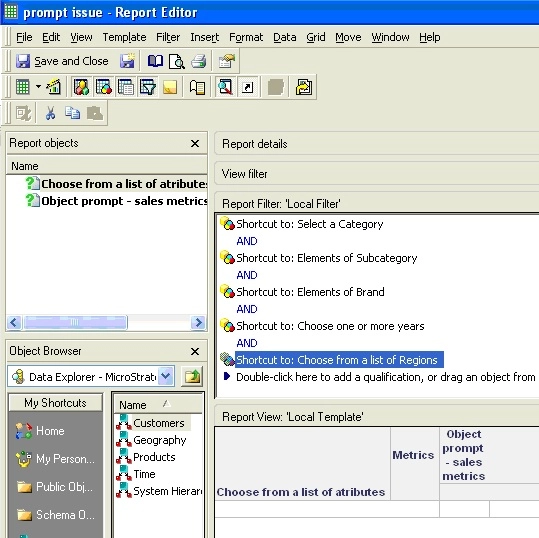
  • Create an attribute element list prompt for the following attributes: Brand, Category, Subcategory and Region.
  • Create an object prompt with multiple metrics.
  • Create a report with all the prompts created in step 1 and 2, and the following prompts from the Prompts folder: "select a category", "choose one or more years", "choose from a list of attributes".

ka04W000000OcuvQAC_0EM4400000026h1.jpeg
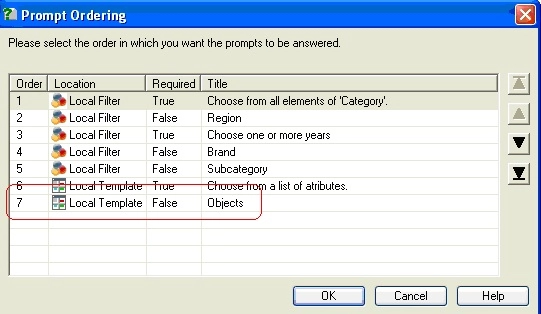
  • In the Report Editor -> Data -> Prompt Ordering, make sure the object prompt for the metrics has the lowest priority, i.e shows up last among all prompts.

ka04W000000OcuvQAC_0EM4400000026gt.jpeg
  • Execute the report in Web, answering all prompts. For the metrics object prompt, select multiple prompts in descending alphabetical order.

ka04W000000OcuvQAC_0EM4400000026gw.jpeg
  • Observe that once the report is executed, the metrics on the grid will be ordered in descending alphabetical order.

ka04W000000OcuvQAC_0EM4400000026gz.jpeg
  • Re-prompt the report and click on “run report” without modifying any of the existing prompts. Make sure that the object prompt is not displayed on the screen.
  • Observe that this time, the metrics are displayed in ascending alphabetical order.

ka04W000000OcuvQAC_0EM4400000026gq.jpeg

CAUSE:
 
This is a known issue in Strategy Web 9.3.x - 9.4.x when running a RSD in Internet Explorer 9.x. The ordering of the object prompt is not loaded unless the prompt is rendered on the screen.
 
ACTION:
 
Issue has been addressed in version 10.x. Please upgrade to this version or newer to take advantage of the fix.
 
WORKAROUND:
 
When re-prompting, make sure the entire prompt page is loaded by scrolling to the end of the prompt page and ensuring that the object prompt is displayed. Another option is to move the object prompt up in the order, so that it displays on the initial prompts page.


Comment

0 comments

Details

Knowledge Article

Published:

June 24, 2017

Last Updated:

June 24, 2017