EducationSoftwareStrategy.com
StrategyCommunity

Knowledge Base

Product

Community

Knowledge Base

TopicsBrowse ArticlesDeveloper Zone

Product

Download SoftwareProduct DocumentationSecurity Hub

Education

Tutorial VideosSolution GalleryEducation courses

Community

GuidelinesGrandmastersEvents
x_social-icon_white.svglinkedin_social-icon_white.svg
Strategy logoCommunity

© Strategy Inc. All Rights Reserved.

LegalTerms of UsePrivacy Policy
  1. Home
  2. Topics

KB43445: Users are unable to auto arrange the attributes in a user hierarchy with Regular Layout in Architect Graphical Interface in MicroStrategy Developer 9.4.1 and 10.x


Stefan Zepeda

Salesforce Solutions Architect • Strategy


Users are unable to auto arrange the attributes in a user hierarchy with Regular Layout in Architect Graphical Interface in MicroStrategy Developer 9.4.1 and 10.x

SYMPTOM
Consider that a user creates a user hierarchy in the Architect graphical interface from the Hierarchy View tab.
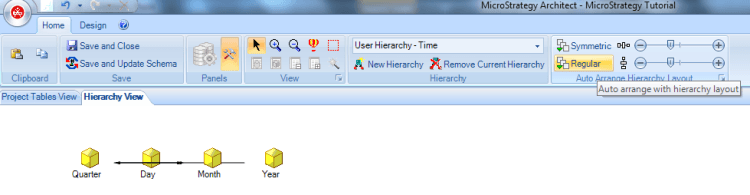
The user creates the attributes to the user hierarchy and creates the browse paths between the attributes. When the user clicks on Regular in the toolbar, the layout does not auto arrange the attributes in the hierarchy in a hierarchical pattern:
ka02R000000kcFHQAY_0EM440000002CpN.png

 
CAUSE
This is a known issue with Strategy Architect.
 
ACTION
Contact Strategy Technical Support for an update on the status of this issue.
 
WORKAROUND
After creating the user hierarchy, click on any other hierarchy in the drop down from the toolbar:
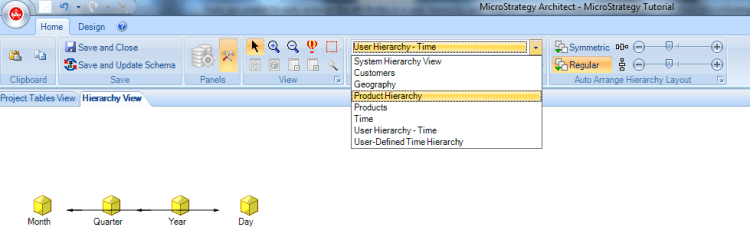
ka02R000000kcFHQAY_0EM440000002CpL.png


ka02R000000kcFHQAY_0EM440000002CpJ.png

 
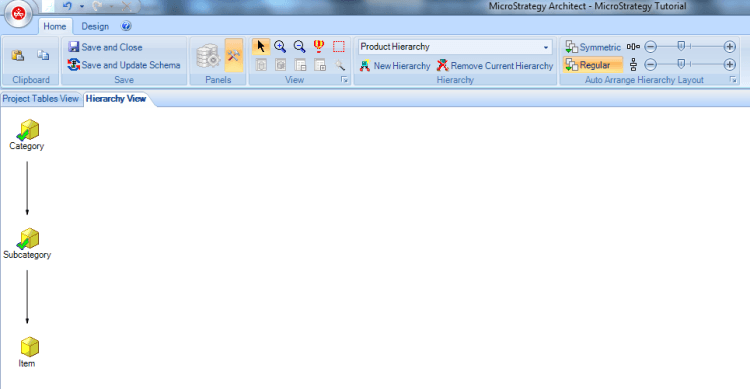
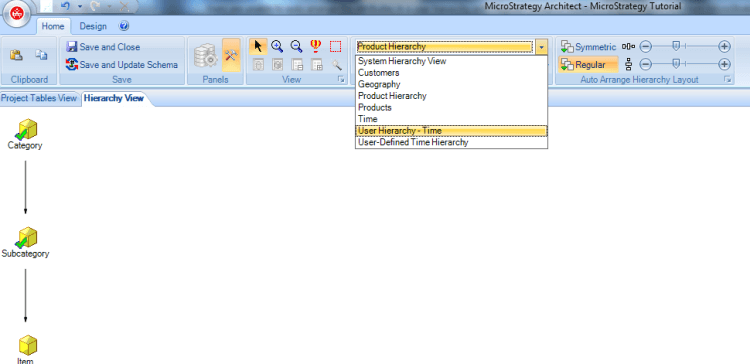
From the drop down in the tool bar, go back to the user hierarchy that you created and now click on Regular. The layout auto arranges the attributes in the hierarchy in a hierarchical pattern:

ka02R000000kcFHQAY_0EM440000002CpO.png


ka02R000000kcFHQAY_0EM440000002CpM.png


Comment

0 comments

Details

Knowledge Article

Published:

May 17, 2017

Last Updated:

May 17, 2017