SYMPTOM:
In some business scenarios, it may be required to insert many fields into one warehouse row using one SUBMIT transaction in Web Express mode. There may be enough fields that it becomes impractical to include all of these on one screen. This is when the requirement to use a single SUBMIT transaction for text entries on multiple panels of a panel stack becomes useful. The ultimate goal is to spread data out over several panels, but have the SUBMIT action selector target the entire panel stack so that all data is inserted when the SUBMIT button is clicked.
The action button can target an entire panel stack, so that part does not pose a problem. However, after adding the dynamic text boxes to the panels and right-clicking a text box following by selecting Configure Transaction... all of the inputs are available for mapping on the left, but in the mapping drop-down menus, only the objects on that panel are selectable for mapping. This poses a problem when clicking OK, since a message will pop up saying that all inputs must be mapped. See the below series of screenshots for a sequential example of this issue:
1) Example Transaction Report in Developer
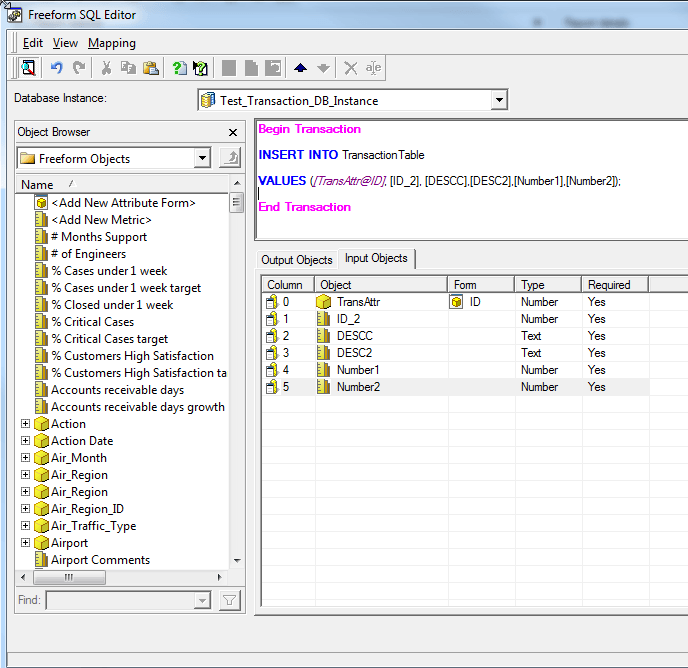
Note that there are 6 inputs here, and the SQL is written to insert each field into one row of a warehouse table.
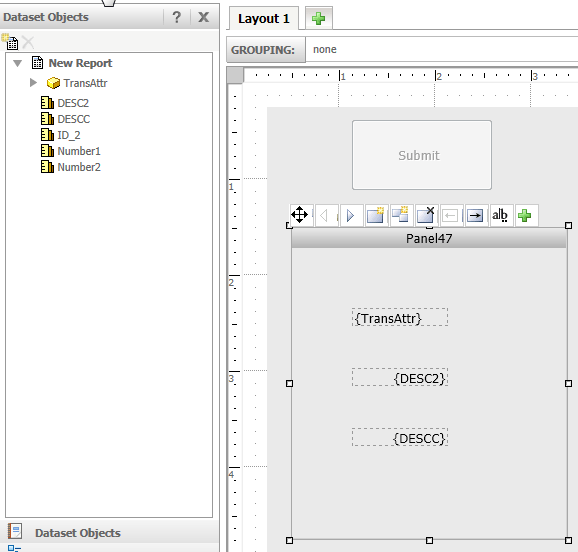
2) Example Dashboard Showing Multiple Objects on Different Panels
Panel 1 which contains three objects to be inputted into the transaction:
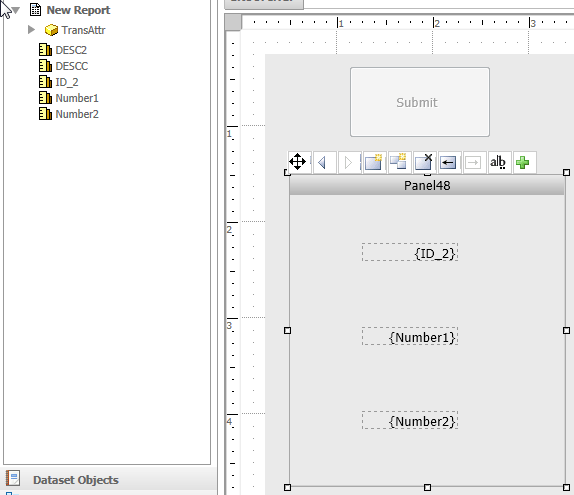
Panel 2 which contains the other three objects to be inputted into the transaction:
3) After Right-clicking One of the Text Boxes and selecting Configure Transaction...
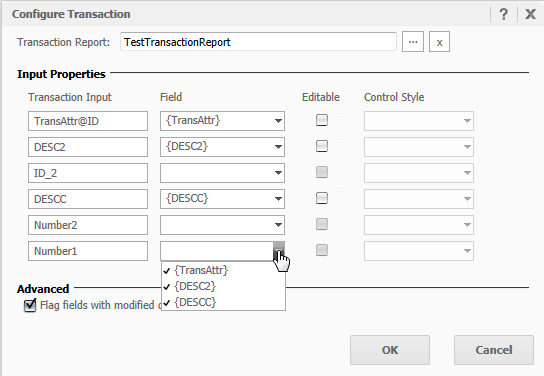
Note that on the left side under Transaction Input, all six inputs show up even though only three are present on this panel. Under the Field header, only the three objects on the panel are selectable in the drop-down menu. This prevents mapping of all inputs. After clicking OK, the following message comes up, preventing us from finishing up the configuration of this transaction:

CAUSE:
This is currently a product limitation. An enhancement has been logged to Strategy Technology.
ACTION:
Strategy will continue to investigate and post updates as soon as they are available.
WORKAROUND:
Strategy Technical Support has tested a workaround to this issue which can be implemented by creating a separate Transaction Report for each panel on the panel stack. This means that a different set of Freeform SQL is sent to the warehouse for each panel. In this case, when configuring the transaction in the dashboard, the number of Transaction Inputs equals the number of mapping Fields. Therefore the popup message does not come up preventing the completion of the transaction.
However, since each panel essentially sends it's own set of SQL to the warehouse, there are some disadvantages to this workaround. One of these is that if multiple users submit transactions at the same time, the customer will need to devise a way to write the SQL in a way that guarantees data integrity and does not overlap user data in the same row. Since this involves writing custom SQL, Strategy Technical Support is limited in it's ability to assist in troubleshooting this. It is the customer's responsibility to write the SQL in such a way that guarantees data integrity.
One tool that can be helpful in determining how the SQL is submitted is the SQL trace described in Tech Note 13189. One example of how this can be useful is to determine the order that Strategy submits transaction SQL for different panels.
KB43472
