SYMPTOM:
In Strategy Web, it is not possible to add or edit View Filter conditions in design mode on an Intelligent Cube Report. These actions are allowed only after the Intelligent Cube Report execution, in grid or graph view modes.
STEPS TO REPRODUCE:
This sample is based on the Strategy Tutorial project.
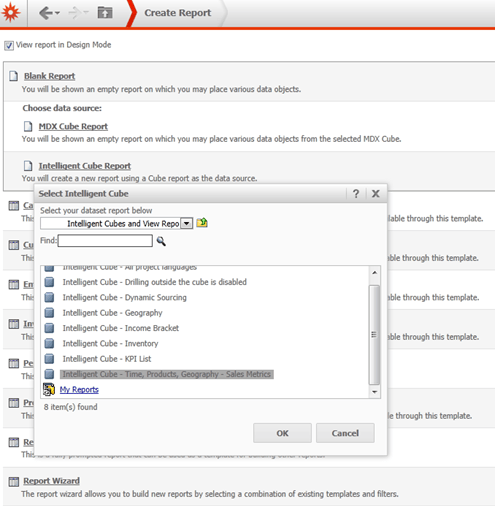
1) Create an Intelligent Cube Report by adding the Time, Products and Geography attributes to rows and the Sales metric to columns.
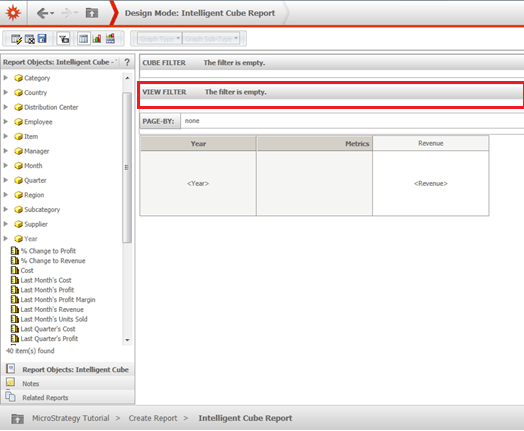
2) Still in design mode, note that it is not possible to add or edit View Filter conditions, as shown:
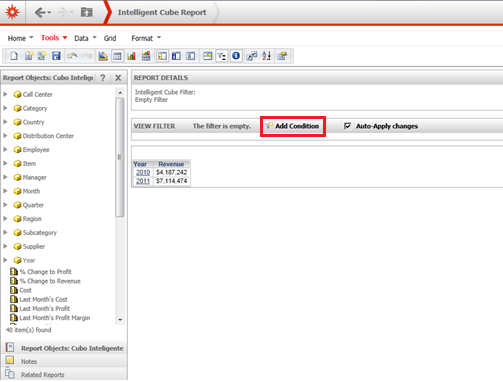
3) After running the Intelligent Cube Report, it is possible to add or edit View Filter conditions in grid or graph view modes, as shown:
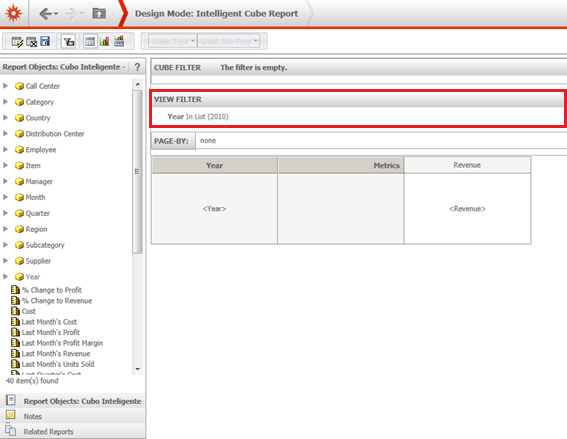
4) Returning to design mode, it is still not possible to edit or add View Filter conditions, as shown:
CAUSE:
It is working as designed, currently, it is not possible to add or edit View Filter conditions on an Intelligent Cube Report in design mode in Strategy Web.
ACTION:
An enhancement Request has been reported to the Strategy Technology team. Contact the Strategy Technical Support for an update on this enhancement request.
WORKAROUND:
As workaround, add or edit View Filter conditions in Strategy Developer or after running the Intelligence Cube Report in Strategy Web, in grid or graph view modes.
