EducationSoftwareStrategy.com
StrategyCommunity

Knowledge Base

Product

Community

Knowledge Base

TopicsBrowse ArticlesDeveloper Zone

Product

Download SoftwareProduct DocumentationSecurity Hub

Education

Tutorial VideosSolution GalleryEducation courses

Community

GuidelinesGrandmastersEvents
x_social-icon_white.svglinkedin_social-icon_white.svg
Strategy logoCommunity

© Strategy Inc. All Rights Reserved.

LegalTerms of UsePrivacy Policy
  1. Home
  2. Topics

KB43489: When trying to create Personal View of report or document the execution does not finish in MicroStrategy Web 9.4.1 and above.


Community Admin

• Strategy


When trying to create Personal View of report or document the execution does not finish in MicroStrategy Web 9.4.1 and above.

SYMPTOM:
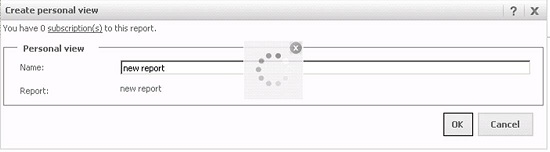
In Strategy Web, the process to create a Personal View on a report or document does not finish. Instead the user sees the loading icon.
 

ka04W000000OeL8QAK_0EM4400000026h4.jpeg

 
At the same time the DSSErrors.log shows the following error messages:
 
Sample Code/Error


Object with ID 'E24F501E802911E1BBCB892C4924019B' and type 51 (Schedule Trigger) is not found in metadata. It may have been deleted.
hPopulatePersonalizationForInstance: Can not get the schedule trigger with id: E24F501E802911E1BBCB892C4924019B.  The error code returned is: -2147216373
CAUSE:
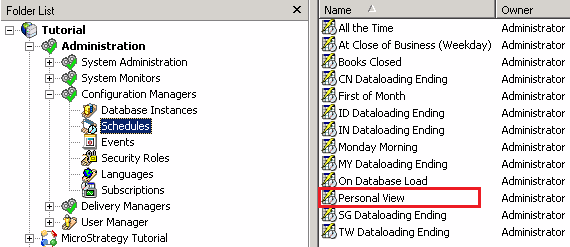
This issue occurs because the schedule trigger "Personal View" is missing, possibly because it has been removed manually.
The "Personal View" schedule is an out of the box object which is visible from Strategy Desktop, under project source Administration > Configuration Managers > Schedules, as shown below:
 

ka04W000000OeL8QAK_0EM4400000026h6.png

 
ACTION:
Contact Strategy Technical Support for steps on how to proceed to fix the issue.


Comment

0 comments

Details

Knowledge Article

Published:

June 12, 2017

Last Updated:

June 12, 2017