How to mimic a Joint Element List using elements from non-ID attribute forms in Strategy Developer 10.x?
Joint Element Lists are an advanced filtering qualification in Strategy Developer / SQL Engine that can be used to filter on combinations of attribute element ID's from multiple attributes. By design, Joint Element Lists will only qualify on attribute ID's. However, it may be desired to created a similarly structured qualification on attribute forms besides the ID. This can be done in a manual fashion in the following way, which mimics the SQL Engine's SQL query structure for standard Joint Element Lists.
Consider a standard Joint Element List defined below. Note that "Country" and "Month of Year" are the selected attributes, and we are filtering on combinations of "Spain & August" and "USA & January".
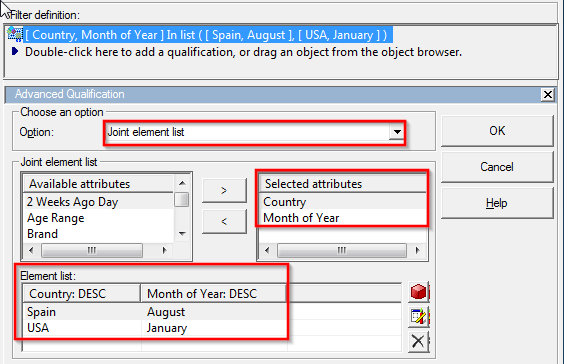
After adding this filter into a report and viewing the SQL, it looks like the following standard Strategy SQL Engine structured SQL, which by design filters on the attributed ID's:
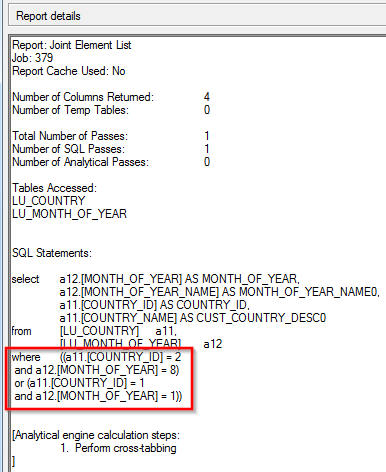
In order to filter on attribute forms besides the ID, the following steps can be performed:
1) For each combination of attribute elements from non-ID forms, create a separate standalone filter using the AND operator. In this case the filtering will be done on the DESC form. For example: "January" AND "USA". In this case, two standalone filters are created and shown below, one for "January & USA" and one for "March & Spain":
Standalone filter 1
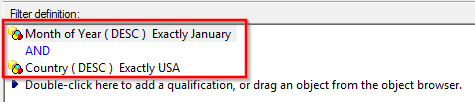
Standalone filter 2
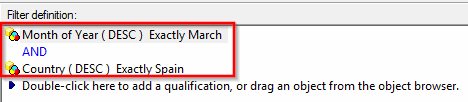
2) Create one more standalone filter in which includes all filters created in step (1) above. In this tech note, this filter will be referred to as the global filter. Make sure to change all operators to OR in this filter as seen in the following screenshot:
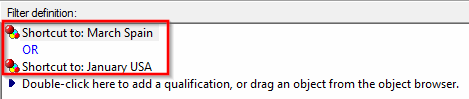
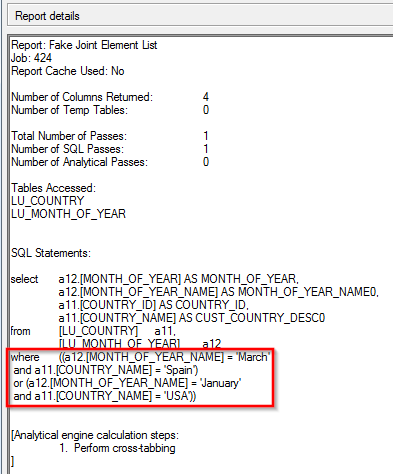
3) Include the global filter created in step (2) in the final report, which should now produce the same SQL as the standard Strategy generated Joint Element List, but qualify on non-ID forms as seen in the following SQL: