EducationSoftwareStrategy.com
StrategyCommunity

Knowledge Base

Product

Community

Knowledge Base

TopicsBrowse ArticlesDeveloper Zone

Product

Download SoftwareProduct DocumentationSecurity Hub

Education

Tutorial VideosSolution GalleryEducation courses

Community

GuidelinesGrandmastersEvents
x_social-icon_white.svglinkedin_social-icon_white.svg
Strategy logoCommunity

© Strategy Inc. All Rights Reserved.

LegalTerms of UsePrivacy Policy
  1. Home
  2. Topics

KB43513: "Syntax Error" message appears when listing all properties for a metric in MicroStrategy Command Manager 9.3.0


Community Admin

• Strategy


This Knowledge Base article describes a known issue that a "Syntax Error" message appears when listing all properties for a metric in MicroStrategy Command Manager 9.3.0. MicroStrategy will continue to investigate and post updates as soon as they are available.

SYMPTOM:
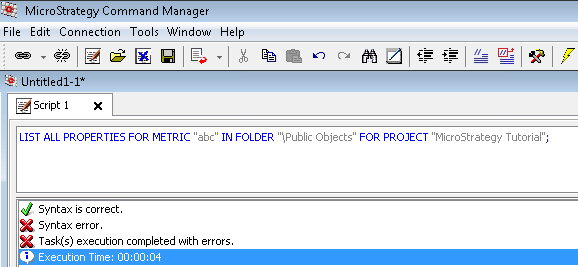
When executing the script to list all properties of a particular metric, Strategy Command Manager returns a syntax error even though the syntax is correct.
 

ka04W000000OfjKQAS_0EM440000002ST5.png


LIST ALL PROPERTIES FOR METRIC "<metric_name>" IN FOLDER "<location_path>" FOR PROJECT "<project_name>";
Syntax is correct.
Syntax error.
Task(s) execution completed with errors.


CAUSE:
This is a known issue in Strategy Command Manager 9.3.0 and Strategy 10.4 and 10.6
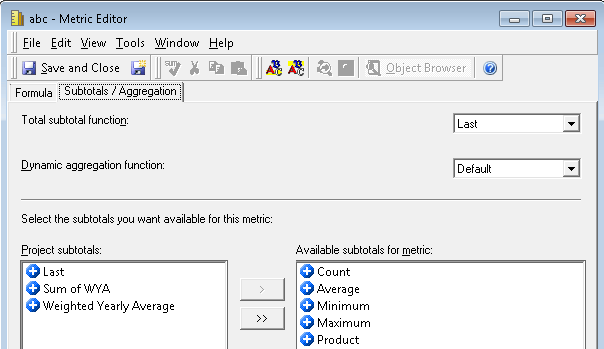
The issue is isolated to when a custom subtotal is set for either the Total subtotal function or Dynamic aggregation function for the metric.
 

ka04W000000OfjKQAS_0EM440000002STJ.png

 
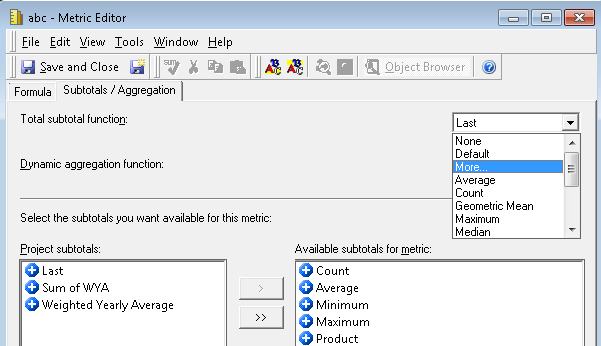
A custom subtotal is set within here by selecting "More..." from the drop down list and navigating to a subtotal object which has been created by a user.
 

ka04W000000OfjKQAS_0EM440000002ST8.png

 
ACTION:
This issue has been fixed in Strategy 10.9, and Strategy 10.4 hotifx 5.
 
WORKAROUND:
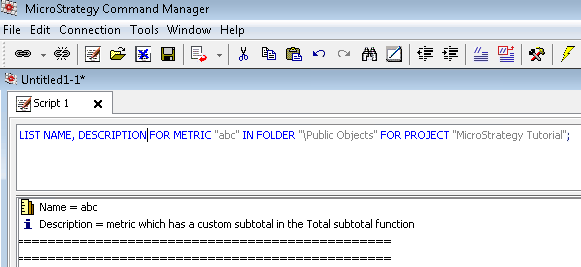
Listing the individual properties desired still returns the values successfully.  An example of listing the metrics name and description is below.
 

ka04W000000OfjKQAS_0EM440000002ST9.png


LIST NAME, DESCRIPTION FOR METRIC "<metric_name>" IN FOLDER "<location_path>" FOR PROJECT "<project_name>";


KB26103


Comment

0 comments

Details

Knowledge Article

Published:

June 26, 2017

Last Updated:

May 7, 2018