EducationSoftwareStrategy.com
StrategyCommunity

Knowledge Base

Product

Community

Knowledge Base

TopicsBrowse ArticlesDeveloper Zone

Product

Download SoftwareProduct DocumentationSecurity Hub

Education

Tutorial VideosSolution GalleryEducation courses

Community

GuidelinesGrandmastersEvents
x_social-icon_white.svglinkedin_social-icon_white.svg
Strategy logoCommunity

© Strategy Inc. All Rights Reserved.

LegalTerms of UsePrivacy Policy
  1. Home
  2. Topics

KB43527: What is the Trusted Certificates parameter in the Mobile Configuration for Android in MicroStrategy Mobile 9.4.x


Community Admin

• Strategy


This KB article discusses what is the Trusted Certificates parameter that can be found in the Mobile Configuration

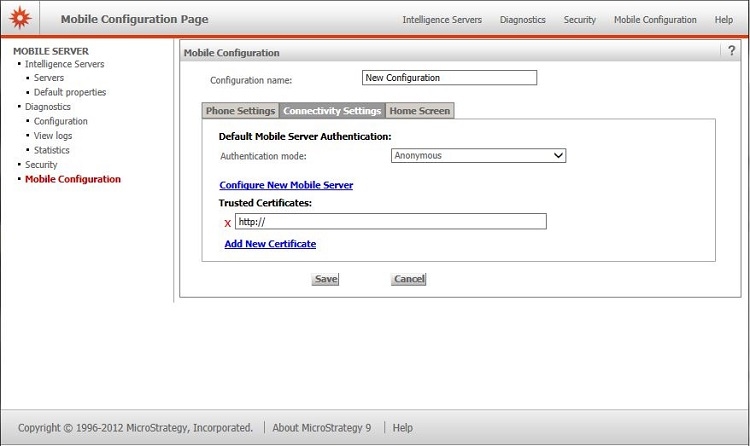
In Strategy Mobile 9.4.x, when creating or editing a Mobile Configuration for Android, in the tab Connectivity Settings, there is a parameter named "Trusted Certificates", as shown: 
ka04W000000OfbSQAS_0EM440000002UwR.jpeg

 
The Trusted Certificates parameter in the Connectivity Settings tab in the Mobile Configuration for Android phone or tablet is intended to specify the location of the certificates to be used in the Secure Socket Layer (SSL) configuration in Strategy Mobile to use HTTPS.
This option is not available in 10.x version.
KB43527


Comment

0 comments

Details

Knowledge Article

Published:

July 21, 2017

Last Updated:

August 3, 2018