EducationSoftwareStrategy.com
StrategyCommunity

Knowledge Base

Product

Community

Knowledge Base

TopicsBrowse ArticlesDeveloper Zone

Product

Download SoftwareProduct DocumentationSecurity Hub

Education

Tutorial VideosSolution GalleryEducation courses

Community

GuidelinesGrandmastersEvents
x_social-icon_white.svglinkedin_social-icon_white.svg
Strategy logoCommunity

© Strategy Inc. All Rights Reserved.

LegalTerms of UsePrivacy Policy
  1. Home
  2. Topics

KB4357: How to create an Attribute Form ’Last_Name, First_Name’ in MicroStrategy Developer 10.x


Stefan Zepeda

Salesforce Solutions Architect • Strategy


This Article explains how to combine two columns with First Name and Last Name separately into one attribute from inside of MicroStrategy.

This Article explains how to combine two columns with First Name and Last Name separately into one attribute from inside of Strategy.
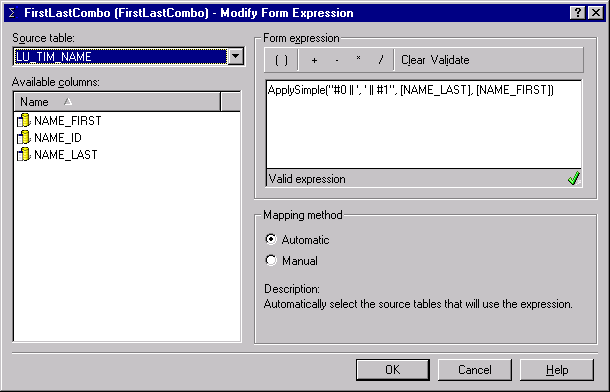
To create an attribute form that allows the attribute to display a name in the format of 'Last_Name, First_Name' in Strategy 10.x, open the Attribute Editor for the desired attribute and create a new form with the following syntax in the Form Expression section:
ApplySimple("#0 ',' #1", ,)
NOTE: The ' ' in the above syntax is the Oracle-specific syntax used to concatenate strings. For this to work in other database platforms, replace the ' ' with the syntax for the specific database.
 

ka02R000000kcLGQAY_0EM440000002GIR.gif

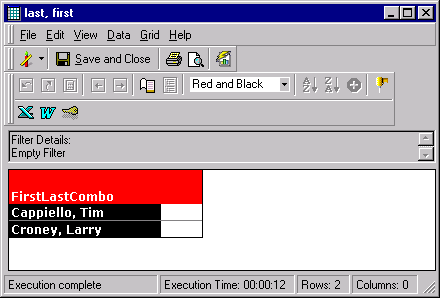
The resulting report appears as follows:
 

ka02R000000kcLGQAY_0EM440000002GIT.gif

Comment

0 comments

Details

Knowledge Article

Published:

May 9, 2017

Last Updated:

May 9, 2017