EducationSoftwareStrategy.com
StrategyCommunity

Knowledge Base

Product

Community

Knowledge Base

TopicsBrowse ArticlesDeveloper Zone

Product

Download SoftwareProduct DocumentationSecurity Hub

Education

Tutorial VideosSolution GalleryEducation courses

Community

GuidelinesGrandmastersEvents
x_social-icon_white.svglinkedin_social-icon_white.svg
Strategy logoCommunity

© Strategy Inc. All Rights Reserved.

LegalTerms of UsePrivacy Policy
  1. Home
  2. Topics

KB43587: MicroStrategy Web installation fails with the error: MISSING: "Default Web Site" in IIS


Community Admin

• Strategy


Article documents why the error MISSING: "Default Web Site" in IIS occurs when attempting to install MicroStrategy Web.

SYMPTOM
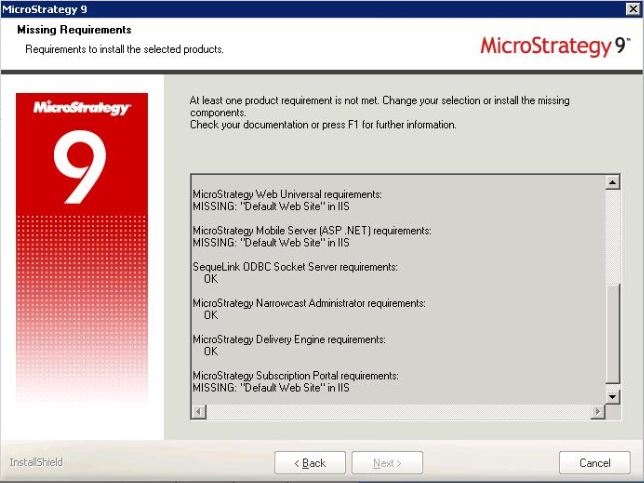
Strategy Web and other related products installation fails with the following error:
 
MISSING: "Default Web Site" in IIS
 

ka04W000000OddgQAC_0EM440000002HLb.jpeg


CAUSE
This can be seen in cases where users rename the default IIS web site object from "Default Web Site" to something else. Starting with Strategy 9.3.1, the installation routine specifically looks for the name "Default Web Site" as this is the default name that it expects to see with IIS.


ACTION
For the installation to proceed, rename the website object under IIS to "Default Web Site". After the installation is complete, if desired, users can rename the default website object. However, any Strategy installation operations such as repair, upgrade or uninstall are all dependent on the name "Default Web Site". At the time of these operations, users have to rename the website object back to "Default Web Site".


Comment

0 comments

Details

Knowledge Article

Published:

April 10, 2017

Last Updated:

April 10, 2017