EducationSoftwareStrategy.com
StrategyCommunity

Knowledge Base

Product

Community

Knowledge Base

TopicsBrowse ArticlesDeveloper Zone

Product

Download SoftwareProduct DocumentationSecurity Hub

Education

Tutorial VideosSolution GalleryEducation courses

Community

GuidelinesGrandmastersEvents
x_social-icon_white.svglinkedin_social-icon_white.svg
Strategy logoCommunity

© Strategy Inc. All Rights Reserved.

LegalTerms of UsePrivacy Policy
  1. Home
  2. Topics

KB43594: Project duplication inside same project source takes more time in System Manager than Developer


Stefan Zepeda

Salesforce Solutions Architect • Strategy


When doing a project duplication inside the same project source through MicroStrategy System Manager, it takes more time than Developer.

SYMPTOM:
When doing a project duplication inside the same project source through Strategy System Manager, it takes more time than Developer. For example, consider the following test results:

  • Project duplication inside the same project source in Developer took about 3:31 minutes while it took about 24:47 minutes in a System Manager workflow
  • Project duplication inside the same project source in Developer took about 3 minutes while it took about 8 minutes in a System Manager workflow 

 
CAUSE:
The project duplication xml file fed into System Manager was generated with a setting that instructs System Manager to copy project related users.
 
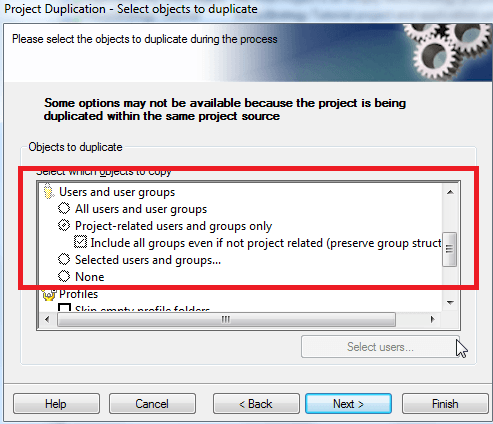
When using the project duplication wizard in Developer to duplicate projects within the same project source, the option 'project-related users and group only' is disabled as shown below:
ka02R000000kWVaQAM_0EM440000002SSc.png

 
So the project duplication in Developer will skip the step of loading all the users and user groups. But since this option is checked by default, the project duplication xml file is configured to load all the users and user groups. So when System Manager uses this xml file to do project duplication, it takes more time than Developer, especially when there is a large number of users or user groups.  
 
ACTION:
Currently a fix for this issue is not scoped for any upcoming scheduled release.
 
WORKAROUND:
Use the following steps to work around the issue:

  1. Open the project duplicate xml file and find the following value:
    
    <PropertyDef Name="CopyProjectRelated Objects" Value="True"/>
    <Users>
    <Settings>
    <PropertyDef Name="MatchByLogin" Value="False"/>
    <PropertyDef Name="Copy" Value="Copy Project RelatedUsers"/>
    <PropertyDef Name="CopyAllGroups" Value="True"/>
    </Settings>

  2. Change “Copy Project RelatedUsers” to “Copy No Users".
  3. Save the xml file, and use this new xml file to duplicate project in System Manager.

Comment

0 comments

Details

Knowledge Article

Published:

July 6, 2017

Last Updated:

July 6, 2017