SYMPTOM:
When trying to access a report services document or report in Strategy Web 9.4.1 in an ASP environment, the following error appears:

Error Summary
HTTP Error 401.12 - Unauthorized
You are not authorized to view this page due to invalid authentication headers.
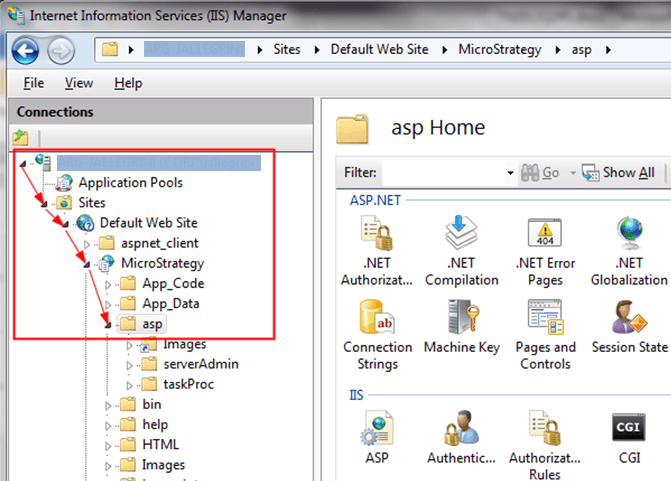
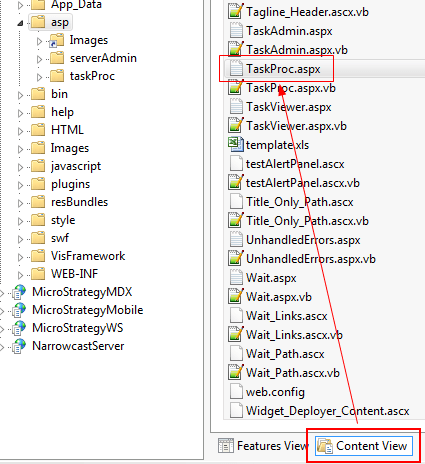
2) Right mouse click on the asp folder, select the option Switch to Content View, on the right side, click on the TaskProc.aspx file:
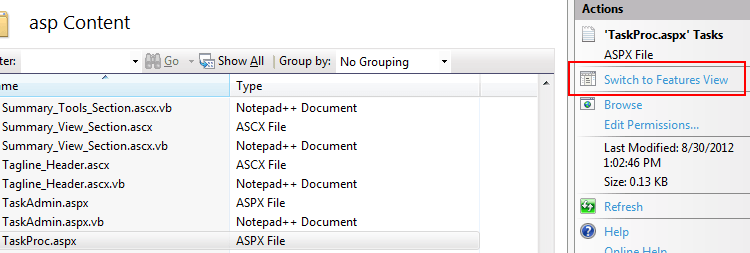
3) On the right side panel click on the Switch to Feature View option:
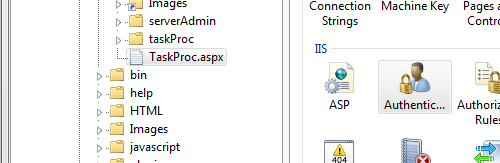
4) Once in Feature View, double click on the Authentication option:
5) Click on the Anonymous Authentication option in order to enable its properties on the right panel side, so click on the Enable option:
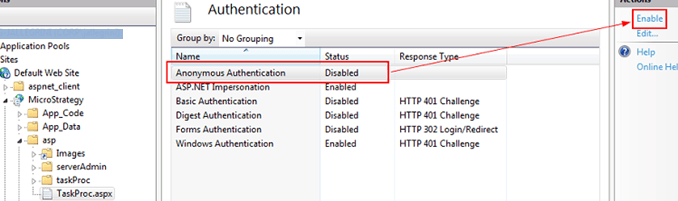
6) The Anonymous Authentication for the TaskProc.aspx file is enable, as shown:
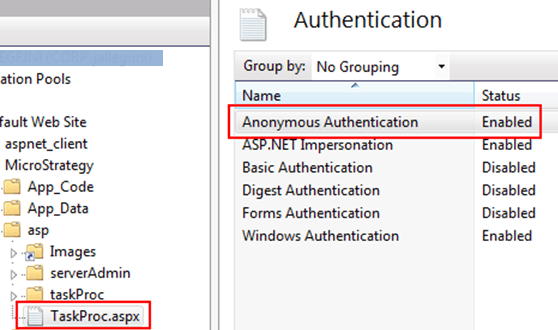
7) Restart the Microsoft Internet Information Services to make sure that this configuration change is applied with success.
WARNING:
Third Party Software Installation WARNING:
The third-party product(s) discussed in this technical note is manufactured by vendors independent of Strategy. Strategy makes no warranty, express, implied or otherwise, regarding this product, including its performance or reliability.
