EducationSoftwareStrategy.com
StrategyCommunity

Knowledge Base

Product

Community

Knowledge Base

TopicsBrowse ArticlesDeveloper Zone

Product

Download SoftwareProduct DocumentationSecurity Hub

Education

Tutorial VideosSolution GalleryEducation courses

Community

GuidelinesGrandmastersEvents
x_social-icon_white.svglinkedin_social-icon_white.svg
Strategy logoCommunity

© Strategy Inc. All Rights Reserved.

LegalTerms of UsePrivacy Policy
  1. Home
  2. Topics

KB43623: How to create a metric that determines the number of business days between two prompted dates in the MicroStrategy Desktop


Stefan Zepeda

Salesforce Solutions Architect • Strategy


In some business scenarios, it is required to create a metric that determines the number of business days between two prompted dates in the MicroStrategy Developer, without need to modify the tables in Warehouse database.

In some business scenarios, it is required to create a metric that determines the number of business days between two prompted dates in the Strategy Developer, without need to modify the tables in Warehouse database.
 
NOTE:
If two dates are different attributes from different Warehouse table columns, some modifications need to be done against the Warehouse. Refer to following technical note for detailed instructions: KB6012 - How to create a metric that determines the number of business days between two dates in the MicroStrategy Developer 9.x and10.x
 
 
Use attribute in Tutorial project as an example. For the steps below to achieve the requirement:
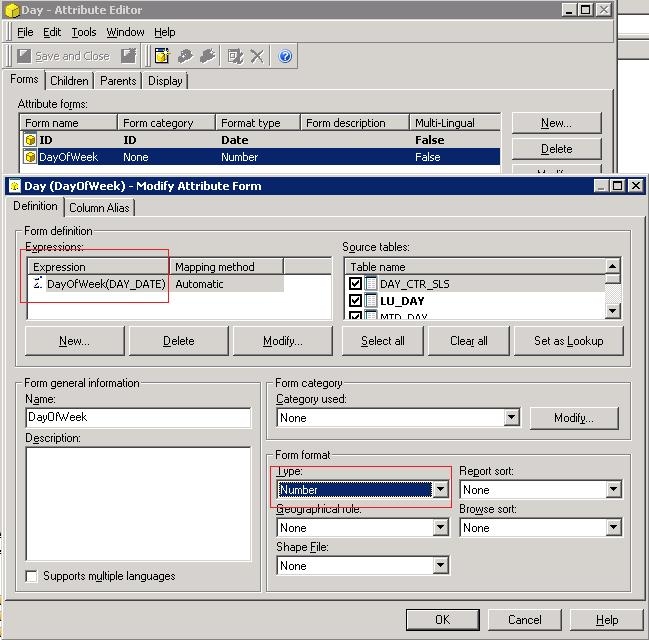
  • In Strategy Developer, edit the attribute . Create a new attribute form named 'DayOfWeek' with expression "DayOfWeek(DAY_DATE)", as shown below:
ka04W000000OfO8QAK_0EM440000002Cn7.jpeg
  • NOTE:
    The function 'DayOfWeek' will return an integer value which '1' means 'Sunday', '2' means 'Monday' and so forth. And select the form format as 'Number'.
     
  • Save and close the attribute.
  • Update Schema.
  • Create a filter, and several qualifications:
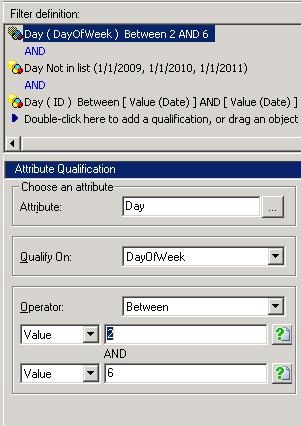
    • The first qualification is added to have week days from Monday to Friday, by qualifying value of DayOfWeek from 2 to 6, as shown below:
ka04W000000OfO8QAK_0EM440000002Cmj.jpeg
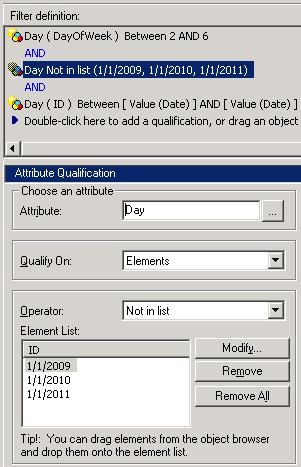
    • The second qualification is added to exclude public holidays. This qualification is optional according to detailed requirement. In this situation, just exclude the New Year's Day, as shown below:
ka04W000000OfO8QAK_0EM440000002Cmk.jpeg
    • The last qualification is added to allow user to select two dates as the start and end dates, as shown below:
ka04W000000OfO8QAK_0EM440000002Cmi.jpeg
  • Save and close the filter as 'Workdays'.
  • Create a new metric to count on attribute , with the filter 'Workdays' as the condition, as shown below:
ka04W000000OfO8QAK_0EM440000002Cn6.jpeg
  • Save the metric.
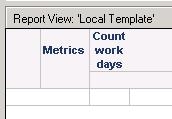
  • Create a new report with the metric in column, as shown below:
ka04W000000OfO8QAK_0EM440000002Cn5.jpeg
  • Run the report, and answer the two prompts. Use 5/3/2009 and 5/10/2009 as the example, as shown below:
ka04W000000OfO8QAK_0EM440000002Cml.jpeg
  • The report shows that there are five business days between the selected dates, excluding Saturday and Sunday, as shown below:
ka04W000000OfO8QAK_0EM440000002Cn9.jpeg


KB414642


Comment

0 comments

Details

Knowledge Article

Published:

June 6, 2017

Last Updated:

May 16, 2018