EducationSoftwareStrategy.com
StrategyCommunity

Knowledge Base

Product

Community

Knowledge Base

TopicsBrowse ArticlesDeveloper Zone

Product

Download SoftwareProduct DocumentationSecurity Hub

Education

Tutorial VideosSolution GalleryEducation courses

Community

GuidelinesGrandmastersEvents
x_social-icon_white.svglinkedin_social-icon_white.svg
Strategy logoCommunity

© Strategy Inc. All Rights Reserved.

LegalTerms of UsePrivacy Policy
  1. Home
  2. Topics

KB43630: Graphs axis label rotation does not appear rotated when exporting Dashboard in Flash view mode to MHT file in MicroStrategy Web


Community Admin

• Strategy


Graphs axis label rotation does not appear rotated when exporting Dashboard in Flash view mode to MHT file in MicroStrategy Web 9.2.1 Hot Fix 11

 
SYMPTOM:
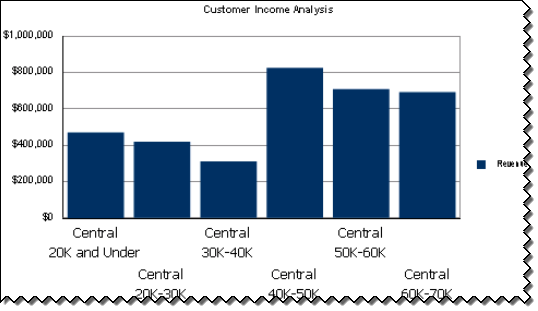
Rotated x axis labels in graphs do not appear rotated in the exported MHT file in Strategy Web 9.2.1 Hot Fix 11, as shown:
 
 
                           Strategy Web - Flash view mode                                                                                      

ka04W000000OgF2QAK_0EM4400000026ev.png

                           Exported Dashboard - MHT file

ka04W000000OgF2QAK_0EM4400000026ex.png


Enabling Flash Debugger, it is possible to confirm that an error occurred when loading the font file in the exported dashboard, as shown:
 
                           Exported Dashboard - MHT file

ka04W000000OgF2QAK_0EM4400000026fA.png


CAUSE:
It is a known issue in Strategy Web 9.2.1 Hot Fix 11.
 
 ACTION:
Strategy will continue to investigate and post updates as soon as they are available
 
 NOTE:
For further information regarding Flash Debugger, refer to the following Strategy Technical Notes:
KB17128: How to enable the Flash Debugger in MicroStrategy Web 9.4.


Comment

0 comments

Details

Knowledge Article

Published:

June 16, 2017

Last Updated:

June 16, 2017