EducationSoftwareStrategy.com
StrategyCommunity

Knowledge Base

Product

Community

Knowledge Base

TopicsBrowse ArticlesDeveloper Zone

Product

Download SoftwareProduct DocumentationSecurity Hub

Education

Tutorial VideosSolution GalleryEducation courses

Community

GuidelinesGrandmastersEvents
x_social-icon_white.svglinkedin_social-icon_white.svg
Strategy logoCommunity

© Strategy Inc. All Rights Reserved.

LegalTerms of UsePrivacy Policy
  1. Home
  2. Topics

KB43669: How to remove the page-by information and report name in the header of the Excel file using Distribution Service


Community Admin

• Strategy


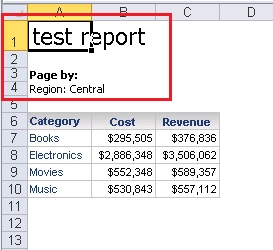
As default, when delivering reports with page-by as Excel file through Distribution Services, the page-by information and report name are shown in the header. This article describes steps to remove page-by information and report name when delivering it through Distribution Services.

As default, when delivering reports with page-by as Excel file through Distribution Services, the page-by information and report name are shown in the header as below:
ka0PW0000002xLlYAI_0EM440000002SSK.png

 
Following below steps to remove page-by information and report name when delivering it through Distribution Services:
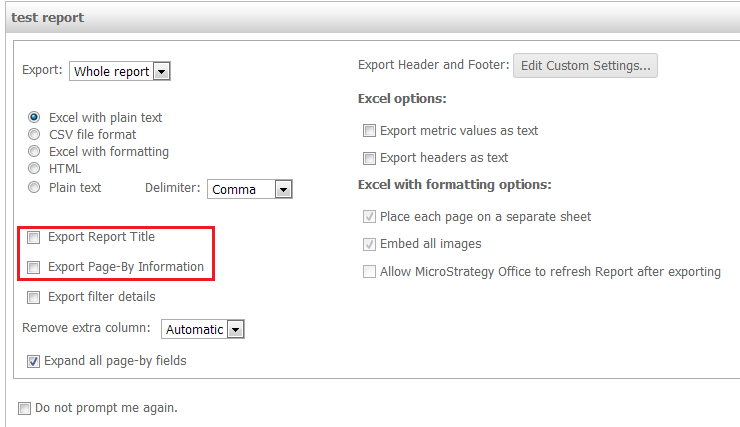
  • Run the report in Strategy Web. Go to  Home > Export > Excel with Formatting or Excel with Plain Text.
  • In the windows prompted, uncheck the option of "Export Report Title" and "Export Page-By Information" as below:

ka0PW0000002xLlYAI_0EM440000002SSJ.png
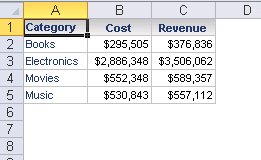
  • Click Export button and save the report to apply the changes. Subscribe the report as Excel through Distribution Services and the Excel file will be shown as below:

ka0PW0000002xLlYAI_0EM440000002SSL.png


Comment

0 comments

Details

Knowledge Article

Published:

July 6, 2017

Last Updated:

August 12, 2024