EducationSoftwareStrategy.com
StrategyCommunity

Knowledge Base

Product

Community

Knowledge Base

TopicsBrowse ArticlesDeveloper Zone

Product

Download SoftwareProduct DocumentationSecurity Hub

Education

Tutorial VideosSolution GalleryEducation courses

Community

GuidelinesGrandmastersEvents
x_social-icon_white.svglinkedin_social-icon_white.svg
Strategy logoCommunity

© Strategy Inc. All Rights Reserved.

LegalTerms of UsePrivacy Policy
  1. Home
  2. Topics

KB43680: When Visual Insight is run inside of an iframe, enabling presentation view creates a full screen view where the content displays outside of the iframe in MicroStrategy Web


Community Admin

• Strategy


When a Visual Insight dashboard is displayed inside of an iframe, enabling Presentation View allows the MicroStrategy content to be displayed outside of the iframe instead of being contained inside it, in MicroStrategy Web 9.3.1

SYMPTOM:
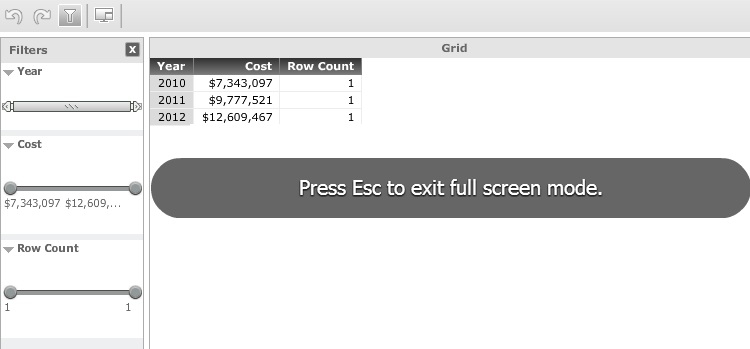
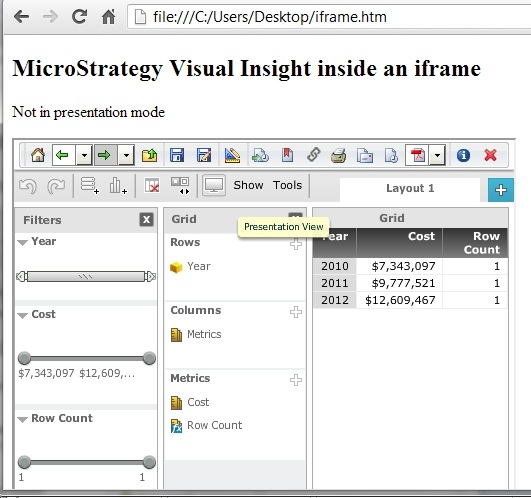
When a Visual Insight dashboard is displayed inside of an iframe, enabling Presentation View allows the Strategy content to be displayed outside of the iframe instead of being contained inside it, in Strategy Web 9.3.1, like shown below.
 

ka04W000000OgIBQA0_0EM4400000026eq.jpeg

 
In Presentation mode.
 

ka04W000000OgIBQA0_0EM4400000026eV.jpeg

 
Notice how the content of the entire browser is occupied by the Visual Insight dashboard and the content of the HTML page outside the iframe is completely covered.
 
STEPS TO REPRODUCE:

  1. Create a Visual Insight dashboard.
  2. Right click on the dashboard object through Strategy Web 9.3.1 > Share > Show HTML.
  3. Copy the content of the HTML provided and paste it into a text file.
  4. Save the text file with an HTML extension.
  5. Execute the HTML file.
  6. Enable presentation view from the toolbar.

CAUSE:
 
This is working as designed. In Strategy Web 9.3.1, presentation view is meant to cover up the entire browser window as in a "full screen" mode and this action takes place regardless of it being inside an iframe. An enhancement request has been logged for a non full screen mode type of presentation view.  


Comment

0 comments

Details

Knowledge Article

Published:

June 15, 2017

Last Updated:

June 15, 2017