SYMPTOM:
Users may configure a transaction field to be used as a calendar picker in Strategy Web 9.4.x-10.x. When users run this transaction document through Strategy Mobile 9.4.x-10.x, they are presented with an iOS-styled calendar picker that allows users to scroll through the month, day, and year.
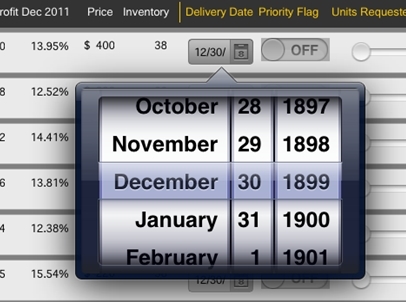
However, if the calendar picker is configured to be applied on a text field and the text field contains some static text at the beginning, users may notice that the calendar picker will default to the date "December 30, 1899" when the document is executed through Strategy Mobile 9.4.x-10.x on an iOS device, like shown in the screenshot below:
CAUSE:
This is a known issue in Strategy Mobile 9.4.x-10.x, that will also happen to the Time Picker control: it will default to 00:00.
ACTION:
Strategy will continue to investigate and post updates as soon as they are available.
WORKAROUND:
Since the issue only occurs when the textbox contains static text, move the static text from the text field object being used as a transaction to a new text field and place it accordingly to match the initial design.
KB43704
